5 minutes
Behavior Trees: A Cleaner Way to Organize Game AI

Behavior trees are a structured way to decide what an AI should do next.
They are popular in games because they are easier to read than a giant state machine and easier to debug than a pile of ad hoc if statements. They do not replace every other AI system, but they are a very good tool when you want behavior that is modular, hierarchical, and easy to inspect.
If you have worked with Unity, you may have seen behavior trees used for enemies, companions, or utility layers around animation and combat. The main reason they stick around is simple: they scale better than many hand-built decision chains.
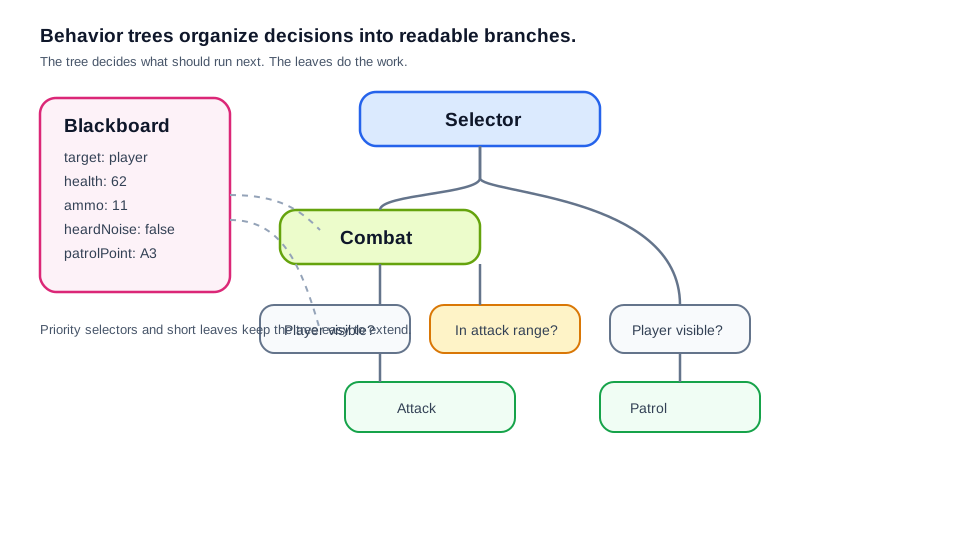
The basic idea
A behavior tree is made of nodes.
There are a few common node types:
- Sequence: run children in order; fail if one child fails
- Selector: run children in order; succeed if one child succeeds
- Decorator: modify a child’s behavior
- Leaf / action: do the actual work
The tree is usually ticked every frame or on a fixed update. Each tick asks, “What should I do right now?”
That means the AI is not trying to solve everything in one giant decision. It walks the tree and finds the next useful action.
Why behavior trees work well
Behavior trees have two strengths that matter a lot in game code:
1. They are readable
A designer or programmer can look at the tree and see the structure of the behavior.
For example:
- If the player is visible
- Move to target
- Attack
- Otherwise
- Patrol
That is much easier to reason about than a spread of nested conditions across several scripts.
2. They are composable
Small behaviors can be reused.
A “move to cover” action can appear in multiple branches. A “has line of sight?” check can sit above several combat actions. You do not need to duplicate the logic every time.
That is the big advantage over simple monolithic AI code.
A simple example
Imagine a guard enemy.
A rough tree might look like this:
- Selector
- Sequence
- If player visible
- If in attack range
- Attack
- Sequence
- If player visible
- Move toward player
- Patrol
- Sequence
This reads almost like English.
If the guard sees the player and is close enough, it attacks. If the guard sees the player but is too far away, it moves closer. If it does not see the player, it patrols.
That is the kind of behavior tree logic people usually want: clear, layered, and easy to extend.
Behavior trees vs finite state machines
This comparison comes up a lot.
A finite state machine says, “The AI is in one state at a time.”
A behavior tree says, “The AI evaluates a hierarchy of decisions and finds the best available branch.”
FSMs are good when the behavior is small and stable. Behavior trees are better when the number of behaviors and transitions starts growing.
The difference is not just style. It affects maintenance.
In an FSM, adding one new feature can mean adding transitions between several states.
In a behavior tree, you often add one new branch or leaf and place it in the hierarchy where it belongs.
That is usually easier to scale.
Practical implementation tips
If you are building behavior trees in Unity, keep these rules in mind:
Keep leaves small
Leaf nodes should do one job well.
Bad leaf:
- “Chase target and aim and decide when to shoot and handle recoil”
Better leaves:
- “Move to target”
- “Aim at target”
- “Fire weapon”
Small leaves are easier to test and reuse.
Use a blackboard
A blackboard is shared data the tree can read and write.
Examples:
- current target
- last seen position
- patrol route
- health
- ammo count
Without a shared data layer, your tree nodes start depending on each other in messy ways. A fuller note on that pattern lives here: Blackboard Architecture for Game AI.
Do not make the tree too clever
A behavior tree should be understandable at a glance.
If the logic becomes full of special cases, the tree loses one of its biggest advantages. Keep the hierarchy simple and let the world state do some of the work.
Think about interruption
Good AI often needs to switch priorities.
If the player appears while the NPC is patrolling, the tree should be able to move from “patrol” to “combat” without weird delays.
This is where priority selectors and decorators become useful.
Where behavior trees fit best
Behavior trees are a strong choice when:
- you want clear, maintainable AI logic
- the behavior is layered and hierarchical
- designers or other programmers may need to read and edit it
- you want the tree to be visible in tooling or debugging views
They are often a good fit for enemies, followers, bosses, and NPCs with a few distinct modes of behavior.
They are less useful when the agent needs to plan long chains of actions from world goals. In that case, GOAP may fit better.
Practical takeaway
Behavior trees are popular because they make AI logic easier to organize.
They do not make the AI “smarter” by themselves. They just give you a cleaner structure for deciding what happens next.
That is often enough to make a game AI feel more reliable and much easier to work on.
Diagram note
The tree diagram above is the right visual for this post. If you add a second image later, a tick-trace or blackboard-state snapshot would be the next most useful one.