12 minutes
Native Collections and Burst for GC-Heavy Projects

If a Unity project is spending too much time in garbage collection, I do not start by looking for a silver bullet.
I start by asking a much duller question: which data path keeps making the managed heap work harder than it needs to?
That is usually where the real win lives. Not in a heroic rewrite. Not in a new architecture. Just in moving the right hot data out of the managed heap, into a native container, and into code that Burst can compile into something the CPU actually likes.
That combination is not a cure for bad design. It is a way to stop paying garbage-collector tax on code that runs every frame.
What problem I am actually trying to solve
A lot of Unity performance advice gets flattened into a single word: “GC”.
That is too vague to be useful.
What I care about is managed allocation pressure. If a hot path keeps creating short-lived objects, arrays, closures, or temporary collections, the runtime has to clean them up later. The cleanup is not free, and the cost usually shows up at the worst possible moment: a frame hitch, a spike, or a stall that only appears when the scene gets busy.
Unity’s own memory documentation says the managed memory system is convenient, but the garbage collector is unpredictable enough to cause performance problems. The profiling docs also make the obvious but important point that memory use has to be measured, not guessed.
So my first move is not “switch everything to native memory”. My first move is “find the hot path that keeps allocating and decide whether the data shape is simple enough to move”.
That distinction matters.
If the code is cold, managed memory is fine. If the code runs once on load, or once per match, or once per menu transition, I do not need to drag native containers into it just to feel clever. If the code runs every frame, on thousands of entities, or in a tight simulation loop, then I start paying attention.
What native containers buy me
Unity’s NativeContainer types are thread-safe wrappers around native memory. That is the short version, and it is the one I keep in my head.
NativeArray<T> is the familiar one. NativeSlice<T> gives me a view into part of an array. The Collections package adds more options like NativeList, NativeHashMap, and friends, which are useful when the data is still dynamic but I do not want it sitting on the managed heap.
The important part is not the type name. It is the memory model.
Native containers let me keep data outside managed memory, share it with jobs, and control the allocation lifetime explicitly. That gives me three practical wins:
- less managed allocation pressure
- data that jobs can read and write safely
- a clearer lifetime story than “hope the GC gets around to it”
The price is that I have to be honest about ownership. Native memory does not magically disappear when a scope ends. I have to allocate it with the right allocator and dispose of it myself.
That is not a bug. That is the trade.
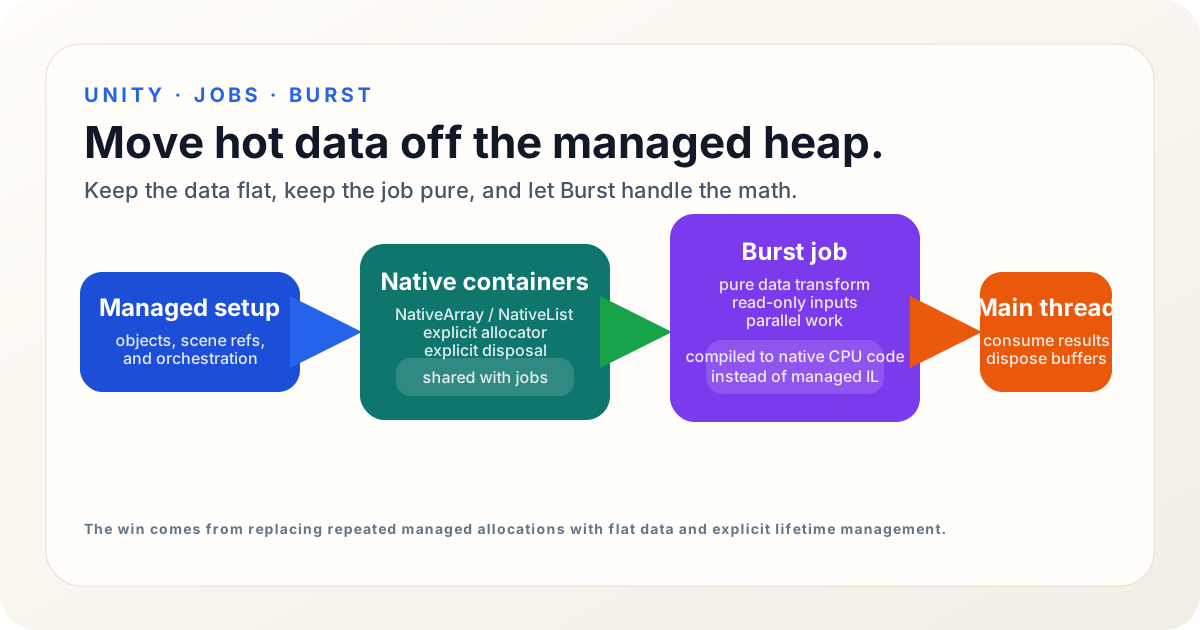
The diagram I keep in mind
I like a very simple mental model for this.
The managed side owns the game’s ordinary objects, UI scripts, and higher-level orchestration. The native side owns the hot data that needs to move quickly. Burst takes the pure data transform and makes it cheaper to run.
Once I frame it that way, the decision becomes easier:
- if the code needs object graphs, inheritance, or engine APIs, keep it managed
- if the code is mostly numbers, flags, positions, counts, or results, consider native containers
- if the work is embarrassingly parallel and data-driven, consider a Burst job
That is usually the whole conversation.
Allocators are the part people skip and regret later
Native containers do not work unless I choose the allocator deliberately.
Unity’s NativeContainer docs are explicit about the common options:
Allocator.Tempis the fastest and is meant for one frame or lessAllocator.TempJobis for short-lived job data and has a four-frame lifetime expectationAllocator.Persistentlasts as long as I need it to, but it is the slowest of the three
That is the part that turns native memory from a performance tool into an actual responsibility.
I use the allocator as a clue about intent:
- Temp means scratch work I will not keep
- TempJob means a short-lived buffer around a job or a small pipeline step
- Persistent means a buffer I intend to reuse across frames or scenes
For most gameplay code, TempJob is the right first try when the data must survive long enough for a job to finish. If I already know I will use the same buffer every frame, I stop allocating it every frame and make it persistent instead.
That last step is where a lot of the benefit comes from. Reuse beats churn.
Burst is not the magic; it is the amplifier
Burst is an ahead-of-time compiler for a subset of C#.
Unity’s Burst docs describe it plainly: it compiles compatible code into highly optimized native CPU code. It was designed for jobs, but it can also compile static methods when the code fits the supported subset. Unity’s blog posts on Burst call out the same theme: Burst is most valuable when the work is CPU-bound and broken into data-oriented pieces that can exploit parallelism.
That is the key sentence.
Burst is not a license to write any old C# and hope for miracles. It rewards code that is already simple, data-driven, and predictable. If the data is scattered across objects, or if the code keeps reaching back into UnityEngine APIs, Burst will not rescue the shape of the problem.
So I treat Burst as a force multiplier, not a substitute for structure.
If I can turn a loop over positions, velocities, visibility flags, heat values, or spawn rules into a pure data transform, Burst is worth looking at. If the code is mostly orchestration, scene plumbing, or UI control flow, Burst is usually the wrong tool.
A small job is the easiest honest example
Suppose I want to cull points against a radius. That is simple enough to show the shape without dragging in a giant subsystem.
using Unity.Burst;
using Unity.Collections;
using Unity.Jobs;
using Unity.Mathematics;

[BurstCompile]
public struct DistanceCullJob : IJobParallelFor
{
    [ReadOnly] public NativeArray<float3> Positions;
    [WriteOnly] public NativeArray<byte> Visible;
    public float3 Center;
    public float RadiusSq;

    public void Execute(int index)
    {
        var delta = Positions[index] - Center;
        Visible[index] = (byte)(math.lengthsq(delta) <= RadiusSq ? 1 : 0);
    }
}
That job does one thing. It reads positions. It writes visibility results. It does not talk to the scene. It does not allocate. It does not poke at a Transform. It is the kind of code Burst can help.
The main-thread setup is just as important as the job itself:
var positions = new NativeArray<float3>(count, Allocator.TempJob);
var visible = new NativeArray<byte>(count, Allocator.TempJob);

for (int i = 0; i < count; i++)
{
    positions[i] = points[i];
}

var job = new DistanceCullJob
{
    Positions = positions,
    Visible = visible,
    Center = center,
    RadiusSq = radius * radius,
};

// Ceiling: this batch size is a starting point, not a law.
// If this becomes a real bottleneck, measure and tune it instead of guessing.
var handle = job.Schedule(positions.Length, 64);
handle.Complete();

for (int i = 0; i < count; i++)
{
    if (visible[i] != 0)
    {
        // use the result
    }
}

visible.Dispose();
positions.Dispose();
That example is intentionally plain.
The point is not the exact algorithm. The point is the flow:
- move the data into native memory
- run the work as a job
- let Burst compile the hot loop
- read the results back on the main thread
- dispose the containers when finished
That is the pattern I reach for when I want a boring, reliable speedup instead of a fragile rewrite.
Read-only data can scale better than I expected
One detail that matters more than people think is the ReadOnly attribute.
Unity’s NativeContainer docs point out that jobs normally get read and write access, but if a job only needs to read data, marking the container [ReadOnly] lets the scheduler run more things in parallel.
That sounds small. It is not.
Read-only data is easier for the job system to schedule safely. It reduces artificial contention. It lets multiple systems consume the same source data without turning one write lock into a traffic jam.
I use that rule aggressively:
- read-only input buffers stay read-only
- output buffers are write-only when possible
- jobs should mutate as little shared state as possible
If I feel tempted to make everything writable “just in case”, I treat that as a design smell. Writable data creates scheduling friction.
Native containers do not mean “put everything in native memory”
This is where the idea gets misused.
Native containers are not a universal replacement for lists, objects, or scene references. They are a tool for a specific problem shape.
I do not reach for them when:
- the data is tiny and cold
- the code needs rich object behavior
- the feature is mostly orchestration
- the bottleneck is elsewhere, like rendering or asset loading
- the code would become harder to understand than the performance win is worth
If a managed List<T> is simple, clear, and fast enough, I leave it alone.
That is not me being timid. That is me avoiding extra lifetime management for no real gain.
The wrong move is to replace every list with a native container because native sounds lower-level. The right move is to convert the specific hot path that keeps generating garbage or stalling the frame.
The memory profiler is where I check myself
I do not trust intuition on this stuff.
Unity’s Memory Profiler module shows where memory is being allocated and how much the runtime is using and reserving. That is useful because a lot of GC problems are misdiagnosed from the outside. A path can feel “slow” when the real issue is allocation churn. Another path can feel “fine” until a later frame pays for all the earlier convenience.
So I look for three things:
- managed allocations that happen repeatedly
- native allocations that are never reused
- frame spikes that disappear when the hot path stops allocating
If I move a hot loop to native memory and the hitch remains, then the problem was never the garbage collector in the first place. Maybe the algorithm is bad. Maybe the data layout is bad. Maybe the work belongs somewhere else.
That is useful too. It means I stopped guessing.
The mistake I see most often
The most common mistake is not using native memory. It is using it without a lifetime plan.
A container gets allocated, passed around, and forgotten. Or it gets reallocated every frame because nobody bothered to keep a persistent buffer around. Or it gets disposed too early because the code path was written as if the job completed instantly.
That is how a performance improvement turns into a crash or a leak.
So I keep a few rules in my head:
- allocate as late as possible
- dispose as early as possible
- reuse persistent buffers when the pattern repeats
- keep job data plain and serializable in spirit, even if it is not literally serialized
- keep engine interaction on the main thread
The last rule is especially important. Jobs are for data processing, not for pretending the Unity API became thread-safe overnight.
When I would use this in a real game
I reach for NativeContainer plus Burst when I see a problem like one of these:
- thousands of boids, agents, or projectiles need the same math every frame
- a visibility, distance, or influence pass is running hot
- I am building intermediate arrays for spawn, cull, or sort steps
- AI, combat, or simulation data can be flattened into plain structs
- the code is CPU-bound and not tied to scene objects
That last point matters most.
If the expensive part is mostly computation, I can often move it to jobs and Burst. If the expensive part is scene traversal, asset loading, rendering, or API calls, native memory alone will not help much.
So I use the profiler first, not because that sounds disciplined, but because it saves me from solving the wrong problem.
The practical split that keeps me sane
When I am deciding whether to convert a path, I ask four questions:
- Is this code actually hot?
- Is the data simple enough to flatten?
- Can the work run without touching UnityEngine objects?
- Will the memory lifetime be obvious after the change?
If the answer to all four is yes, I start with a small native buffer and a small Burst job.
If the answer to one of them is no, I do not force it.
That restraint is the real trick. Native containers and Burst are powerful, but they are easiest to use when the problem is already shaped for them. The more I try to bend a messy object graph into a job shape, the more I fight the tool.
A good rule of thumb
If I can describe the work as “take this flat data, transform it, and write out results”, I am probably in the right neighborhood.
If I need object identity, polymorphism, live scene references, or lots of branching around engine state, I am probably not.
That is a useful line because it keeps me from overengineering. I do not need to migrate an entire system to DOTS just because one loop allocates too much. I only need to move the hot piece of the loop off the managed heap, stop allocating temporary garbage, and let Burst do the simple math faster.
That is enough to make a real difference.
Takeaway
My default approach is simple:
- profile first
- find the allocation-heavy hot path
- flatten the data if the shape allows it
- use
NativeArray,NativeList, or another native container with the right allocator - mark read-only inputs as
[ReadOnly] - keep the job pure data and let Burst compile the hot loop
- reuse persistent buffers instead of churning memory every frame
That is not glamorous, but it is the kind of change that actually survives a production project.
If I get the shape right, the GC gets quieter, the frame spikes get smaller, and the code is still understandable six months later. That is the whole point.
References
- Unity Manual: Introduction to NativeContainer
- Unity Scripting API: NativeArray
- Unity Manual: Memory in Unity introduction
- Unity Manual: Optimizing your code for managed memory
- Unity Manual: Memory Profiler module reference
- Unity Burst docs: Burst compiler 1.8.30
- Unity blog: Enhancing mobile performance with the Burst compiler
- Unity blog: Raising your game with Burst 1.7