9 minutes
Async in Unity with UniTask: Waiting Without Turning the Main Thread into a Junk Drawer
Async code in Unity is useful when something needs to wait without freezing the rest of the game.
That sounds straightforward until a project grows beyond a small prototype. Then the waiting logic starts to sprawl across coroutines, callbacks, manager classes, helper methods, and extra Update checks that exist only to ask whether a task is done yet. The result usually works, but it becomes hard to read, hard to cancel, and hard to reason about when something goes wrong.
UniTask gives that problem a cleaner shape. It keeps the async and await style, but stays close to Unity’s execution model and avoids the allocation habits that make plain Task awkward in hot gameplay code.
What async in Unity actually needs to solve
Most Unity projects do not need async because async is fashionable. They need it because some work takes time.
The real problem is not waiting. The real problem is waiting in a way that does not wreck the frame loop, does not lose the thread boundary, and does not turn the code into callback soup.
A useful async setup in Unity usually needs three things:
- code that reads in order
- a way to wait without blocking the main thread
- a way to keep garbage collection pressure under control
That is the core of it.
Anything else is decoration. If a flow touches Unity objects, it still has to respect Unity’s thread rules. Async changes how the code is written, but it does not change where engine APIs are safe to call. Main-thread-only work still belongs on the main thread.
The mental model that keeps async sane
A good way to think about Unity async is as a route through two lanes.
        main thread / PlayerLoop
caller ───────► awaitable work ───────► continuation
   │                 │                      │
   │                 │                      └─ apply results to Unity objects
   │                 └─ background thread for pure C# work only
   └─ start loading / input / UI flow
That diagram is boring on purpose. The boring part is the part that keeps the game from breaking.
The mistake is not using async. The mistake is pretending every step in the flow is safe to run in every context.
If a save file is being parsed, that part can often move to a background thread because it is pure C# work. If a Transform, SceneManager, UI widget, or most engine APIs are involved, that part needs to happen on the main thread. The boundary matters more than the syntax.
Why UniTask fits Unity better than plain Task in game code
Plain Task is fine in general C# code. In Unity, it can become awkward in the places where the game repeats small waits all the time.
Scene transitions. Loading screens. Timed UI sequences. Network polls. Animation-adjacent setup steps. Asset preparation. These are the sorts of flows that appear everywhere in a game project, and they tend to be short-lived, frequent, and sensitive to allocations.
UniTask is built with Unity’s PlayerLoop in mind. It gives awaitable delays, frame waits, Unity async operations, cancellation helpers, and a lightweight model that is better aligned with gameplay code than the generic Task world.
Coroutines can still be a fine tool. They are not bad. They are just a different shape. When a flow is tiny and frame-oriented, an IEnumerator can still be the simplest thing that works. But once a feature starts mixing waits, cancellation, error handling, and async requests, a real async method usually reads better and scales better.
That is the useful distinction: coroutines are good at frame choreography; UniTask is good at procedural async flows that still need to live inside Unity.
The main thing to keep straight: Unity objects are not thread-safe
The biggest source of bugs in async Unity code is thread confusion.
If code is touching engine objects, it belongs on the main thread. If code is doing pure computation or file work, that part can often move off-thread. Those are not the same thing, and treating them as if they are interchangeable causes very strange bugs.
The rule is simple enough to remember:
- pure C# work can often move to the thread pool
- Unity object access should come back to the main thread
That boundary is especially important during loading flows. Parsing JSON or deserializing a save file can often happen off-thread. Applying the results to a scene, a UI, or a player object should happen on the main thread.
A practical loading flow
A loading or save-import flow is one of the cleanest places to use UniTask.
using System;
using System.IO;
using System.Threading;
using Cysharp.Threading.Tasks;
using UnityEngine;

public sealed class SaveLoader : MonoBehaviour
{
    [SerializeField] private GameObject loadingSpinner;
    [SerializeField] private string savePath;

    private void Start()
    {
        LoadSaveAsync(this.GetCancellationTokenOnDestroy()).Forget();
    }

    private async UniTask LoadSaveAsync(CancellationToken token)
    {
        loadingSpinner.SetActive(true);

        try
        {
            await UniTask.SwitchToThreadPool();
            var json = File.ReadAllText(savePath);
            var saveData = ParseSaveData(json);

            await UniTask.SwitchToMainThread(token);
            ApplySave(saveData);
        }
        catch (OperationCanceledException)
        {
            // The object was destroyed or the flow was cancelled.
        }
        finally
        {
            if (this != null)
            {
                loadingSpinner.SetActive(false);
            }
        }
    }

    private static SaveData ParseSaveData(string json)
    {
        // Replace with the project serializer.
        return new SaveData();
    }

    private void ApplySave(SaveData saveData)
    {
        // Unity object updates stay here.
    }

    [Serializable]
    private sealed class SaveData
    {
        public int level;
        public string playerName;
    }
}
The important part is not the exact API names. The important part is the boundary.
The loading spinner is shown on the main thread. File reading and parsing move away from the main thread. The results come back to the main thread before touching Unity objects. That split is what keeps the code predictable.
Cancellation is not optional
Async code without cancellation is one of the fastest ways to create edge-case bugs.
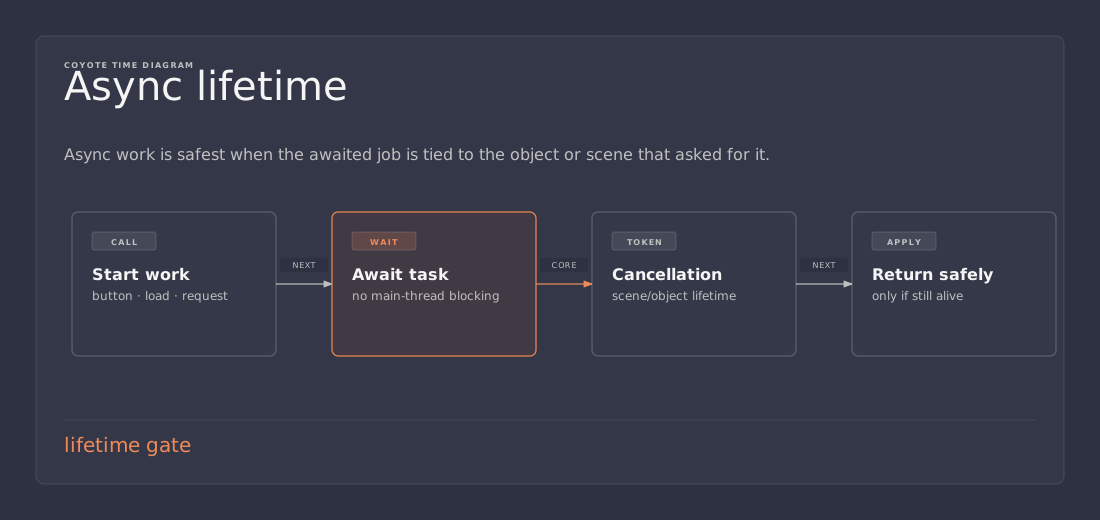
If a scene changes, a menu closes, or a MonoBehaviour is destroyed while the async flow is still running, the work should stop. Otherwise the code may try to update dead objects, close a loading screen that no longer exists, or fire an exception in a path that only appears under awkward user timing.
For Unity objects, a destroy token is the natural fit:
var token = this.GetCancellationTokenOnDestroy();
Passing that token through the whole flow makes the lifetime explicit. The task then belongs to the object that started it, not to some vague global background process.
That one habit prevents a lot of “why did this callback fire after the scene was gone?” debugging sessions.
Where UniTask is a better fit than coroutines
UniTask usually wins when a flow has one or more of these traits:
- it needs cancellation
- it chains several async steps together
- it mixes Unity async operations with pure C# work
- it needs
WhenAllor parallel waits - it reads more clearly as procedural code than as an iterator
Coroutines still make sense when the flow is tiny and frame-oriented.
A simple fade animation, a short delay, or a legacy system that already speaks IEnumerator does not need a dramatic rewrite. Using async everywhere just because it exists is a good way to add ceremony without getting any of the benefits.
The smaller tool is usually the correct one.
Fire-and-forget has a real cost
A lot of Unity async code becomes messy when it hides errors.
Calling Forget() can be a reasonable choice when the task is truly background work that should start and move on. It is not a license to ignore failure paths. Any fire-and-forget flow still needs a clear way to surface exceptions, handle cancellation, and avoid leaving the game in a half-updated state.
That is where many teams accidentally make async harder than coroutines. The method signature looks clean, but the failure mode is now disconnected from the caller. If that path fails silently, the game may keep running with a broken loading screen or a half-applied state change.
The rule is simple: if the flow matters, the failure path matters too.
What usually goes wrong
A few mistakes show up again and again in Unity async code.
Mistake 1: touching Unity objects off-thread
This one causes the strangest bugs because it sometimes appears to work until the timing changes.
Mistake 2: forgetting cancellation
Async work outliving its object is a classic source of orphaned UI, exceptions, and weird late callbacks.
Mistake 3: using async for synchronous work
If the work is small and immediate, async can add more complexity than it removes.
Mistake 4: letting callback chains grow unchecked
Async exists partly to prevent callback soup. A project that just re-creates the same soup with different syntax has not improved anything.
Mistake 5: using background threads as a shortcut
Only pure C# work belongs there. Anything that depends on Unity state should stay on the main thread.
UniTask, coroutines, and Unity’s built-in await support
Unity’s async story has improved a lot over time. Coroutines remain useful. Built-in await support has become better. That is good news because it reduces the old need to invent a custom flow for every async case.
UniTask still has a place because it is designed around the kinds of short, frequent waits that game code uses all the time. It fits nicely when a project wants a mature async layer with a lot of small utilities around the core model.
The easiest way to compare them is like this:
- Coroutines are good for frame choreography and simple waits
- UniTask is good for structured async flows in game code
- Built-in await support makes async more viable inside the engine itself
Those are overlapping tools, not enemies.
A practical rule of thumb
A quick checklist usually makes the decision obvious:
- does this flow need to wait?
- does it need to be cancelled when an object dies?
- does any part of it belong off the main thread?
- would a callback chain make this harder to read?
If the answer is yes to two or more, async is probably worth it.
If the code is just a tiny frame delay, a coroutine or even plain synchronous code may still be the smaller choice.
That is the real test. Use the smallest thing that solves the actual problem.
A slightly richer example: loading a scene setup flow
A scene setup flow often combines several kinds of work:
- wait for a network or file request
- parse data
- update UI
- spawn or configure Unity objects
- hide loading feedback
That is exactly the kind of sequence where async tends to read well.
public async UniTask SetupSceneAsync(CancellationToken token)
{
    loadingOverlay.Show();

    try
    {
        await LoadRemoteProfileAsync(token);
        var data = await ReadLocalSettingsAsync(token);

        await UniTask.SwitchToMainThread(token);
        ApplySettings(data);
        SpawnPlayer();
        RefreshHUD();
    }
    finally
    {
        if (this != null)
            loadingOverlay.Hide();
    }
}
That code reads top to bottom. The important branch points are visible. The thread boundary is explicit. Cancellation follows the lifetime of the object. This is the shape that makes async valuable in a real game project.
The practical takeaway
UniTask is most useful when async needs to stay readable, cancellable, and friendly to Unity’s main-thread rules.
A good Unity async flow usually follows a simple pattern:
- keep Unity object access on the main thread
- move pure C# work off-thread when it helps
- pass a destroy token through the flow
- use coroutines only when they are actually the smaller tool
That keeps waiting code from turning into another junk drawer.
References
- Unity Manual, Write and run coroutines
- Unity Manual, Await support
- Unity Manual, Awaitable completion and continuation
- Cysharp, UniTask GitHub repository
- Unity Scripting API, MonoBehaviour.destroyCancellationToken