7 minutes
Code Smells and How to Fix ‘Em

Code smells are the little warning signs that make code worth a second look. They are not always bugs, and they are not proof that a system is broken. More often, they mean the shape of the code is starting to cost more than it should. A function feels too wide. A parameter list turns into a receipt. The same logic shows up in three places. None of that is dramatic on its own, but each one makes the code harder to trust.
The useful part is that smells usually point somewhere specific. They do not ask for a heroic rewrite. They ask for a cleaner boundary, a smaller function, a shared helper, or a more honest data shape. In game projects, that matters a lot. Combat code, UI glue, state handling, and save logic all age quickly if the structure gets messy. Catching the smell early keeps the work small.
The five smells worth watching first
The ones that show up most often are simple: long functions, long parameter lists, duplicate code, god objects, and overengineering. Those are not the only smells worth learning, but they cover a lot of the everyday pain. They also tend to overlap. Long functions create duplication. Duplication often hides inside a giant manager. Long parameter lists usually mean the data shape is wrong. So if one of these shows up, it is worth checking for a second issue nearby.
That is why this topic is useful. It is not a list of forbidden patterns. It is a habit of noticing when code starts to feel sticky. Once that habit is in place, the fixes become fairly ordinary.
Long functions are usually doing too much
A long function is not automatically bad. Sometimes a little extra length is exactly what the code needs. The problem starts when one function stops feeling like one idea and starts feeling like a pile of unrelated steps. That is when reading it becomes work.
This happens a lot in game code. A damage function starts out simple and ends up handling health, animation, sound, particles, quest updates, and save state. That is too many jobs in one place. The fix is usually not to make the code cleverer. It is to split the work into smaller pieces and give each piece a clear name.
Before:
public void TakeDamage(int amount)
{
    var damage = CalculateDamage(amount);
    health -= damage;
    UpdateHealthUI();
    PlayHitAnimation();
    PlayHitSound();
    SpawnHitParticles();
    NotifyQuestSystem();
}
After:
public void TakeDamage(int amount)
{
    var finalDamage = CalculateFinalDamage(amount);
    ApplyHealthChange(finalDamage);
    PlayDamageFeedback();
}

private void PlayDamageFeedback()
{
    PlayHitAnimation();
    PlayHitSound();
    SpawnHitParticles();
}
The second version is easier to scan because the top-level intent is visible at once. The details are still there, but they are no longer fighting for attention.
Long parameter lists usually mean the data shape is wrong
A function with too many parameters is rarely just a cosmetic problem. It usually means the function is trying to know too much, or the data it needs really belongs together. Either way, the parameter list is the symptom.
Long argument lists make code harder to read and easier to misuse. The call site gets noisy. The order matters too much. Optional values become a guessing game. In game code, that slows everything down. A small utility should not feel like a form that needs to be filled out before it can run.
Before:
public GameObject FindNearestObject(
    float radius,
    bool includeEnemies,
    bool includePlayers,
    bool includeStaticObjects,
    bool ignoreDisabled,
    LayerMask layers)
{
    // search logic here
    return null;
}
After:
public struct SearchOptions
{
    public float Radius;
    public bool IncludeEnemies;
    public bool IncludePlayers;
    public bool IncludeStaticObjects;
    public bool IgnoreDisabled;
    public LayerMask Layers;
}

public GameObject FindNearestObject(SearchOptions options)
{
    // search logic here
    return null;
}
That is a small change, but it makes the intention easier to see. The data now has a shape of its own, and the function reads more like a request than a checklist.
Duplicate code is expensive in the boring way
Duplicate code does not always look dangerous at first. Copy a block, tweak it a little, move on. The cost shows up later, when the same rule changes in one place and not the others. Then the project starts behaving differently depending on which path the player took.
The fix is not to eliminate every repeated line. It is to look for repeated meaning. If two blocks are enforcing the same rule, there should probably be one place where that rule lives. That might be a helper function, a shared service, or a small common data path. The important part is consistency.
Before:
public void ApplyFireDamage(int amount)
{
    health -= amount;
    UpdateUI();
}

public void ApplyIceDamage(int amount)
{
    health -= amount;
    UpdateUI();
}
After:
public void ApplyDamage(int amount)
{
    health -= amount;
    UpdateUI();
}

public void ApplyFireDamage(int amount) => ApplyDamage(amount);
public void ApplyIceDamage(int amount) => ApplyDamage(amount);
That is not glamorous, but it keeps one rule in one place. In practice, that saves more time than most people expect.
God objects make everything feel connected for the wrong reason
A god object is the class that knows too much and does too much. It owns the state, controls the flow, reaches into half the scene, and quietly becomes the place where every new feature lands. That feels convenient right up until it becomes impossible to change anything without worrying about five unrelated systems.
The real fix is boundary work. Separate orchestration from detail. Let one object coordinate the bigger flow, but do not make it personally responsible for every low-level task. Smaller collaborators are easier to understand and easier to replace.
A GameManager that owns input, player health, UI refreshes, quest progression, and save data is a good sign that the boundaries have gone blurry. That kind of object turns the project into one giant room where every conversation happens at once. The code may still work, but it stops being pleasant to work in.
Better boundaries usually mean less surprise later. When a system knows less, changes hurt less.
Overengineering is the smell that looks polished
Not every smell is a sign of too little structure. Sometimes the problem is too much structure. A system can become so abstract that nobody can tell what problem it is solving. That usually happens when flexibility gets added before the project has earned it.
This is the classic “maybe we will need it later” trap. Maybe we will. Maybe we will not. The safer move is to solve the problem in front of us, keep the seams visible, and leave room to extend the code later if that actually becomes necessary. A giant architecture project is a poor trade for a small feature.
That is the part worth remembering: overengineering is still a smell, even when the code looks tidy. Clean-looking code can still be harder to change than messy code if the abstraction is too broad.
One smell often leads to another
These problems tend to travel together. Long functions lead to duplication. Duplicate code hides inside giant managers. Long parameter lists usually mean the data shape is fighting the design. So when a section of code feels off, it is worth checking the neighboring pieces too.
That does not mean everything needs to be fixed in one pass. It usually goes better when the cleanup stays small. Trim the worst function first. Pull out the shared rule. Split the manager. Make the boundary clearer. A chain of small improvements is easier to finish than one grand rewrite.
A simple rule for refactoring
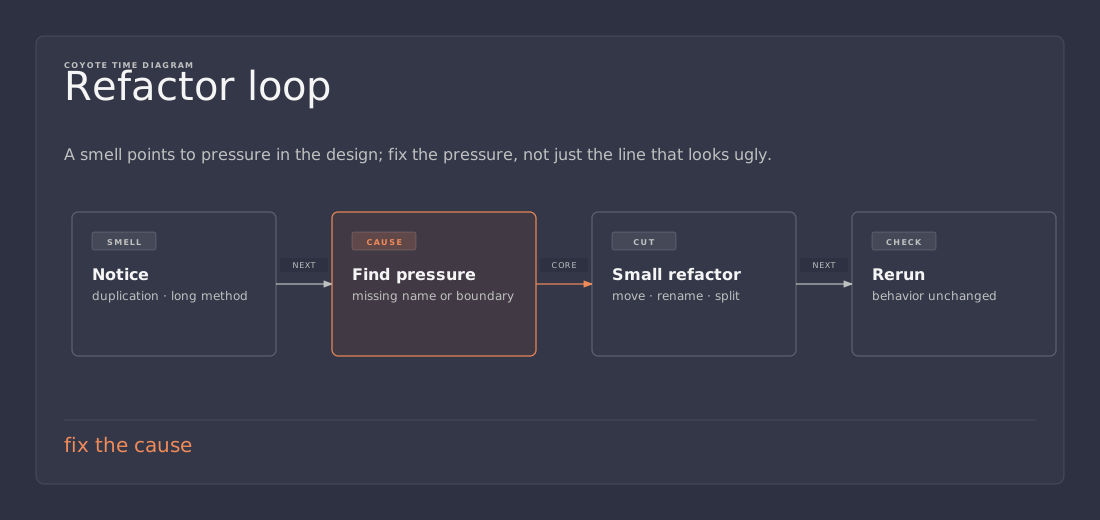
When a code smell shows up, ask what the smell is actually telling you. Does the function need to shrink? Does the data need a better shape? Does the repeated logic want a shared home? Does the class need fewer responsibilities? Those questions usually point at the real fix faster than a vague feeling of “this code is messy.”
That is the useful part of code smells. They give a reason to pause before the code becomes harder to maintain than it needs to be. The goal is not perfect code. The goal is code that is easier to read, easier to change, and less annoying to come back to later.
References
- The Shaggy Dev — “A few common code smells to be aware of and how to fix them” https://shaggydev.com/2023/01/16/code-smells/