13 minutes
Unity CullingGroup: Stop Updating What the Player Cannot Notice
Large Unity scenes often waste CPU time for a simple reason: every object behaves as if the player is paying attention to it.
An NPC behind a building runs the same animation graph as one standing in front of the camera. A distant ambient effect keeps updating. Every possible spawn point checks its surroundings. Hundreds of world markers measure their distance from the player in separate Update methods.
None of those decisions is individually disastrous. Their combined cost is.
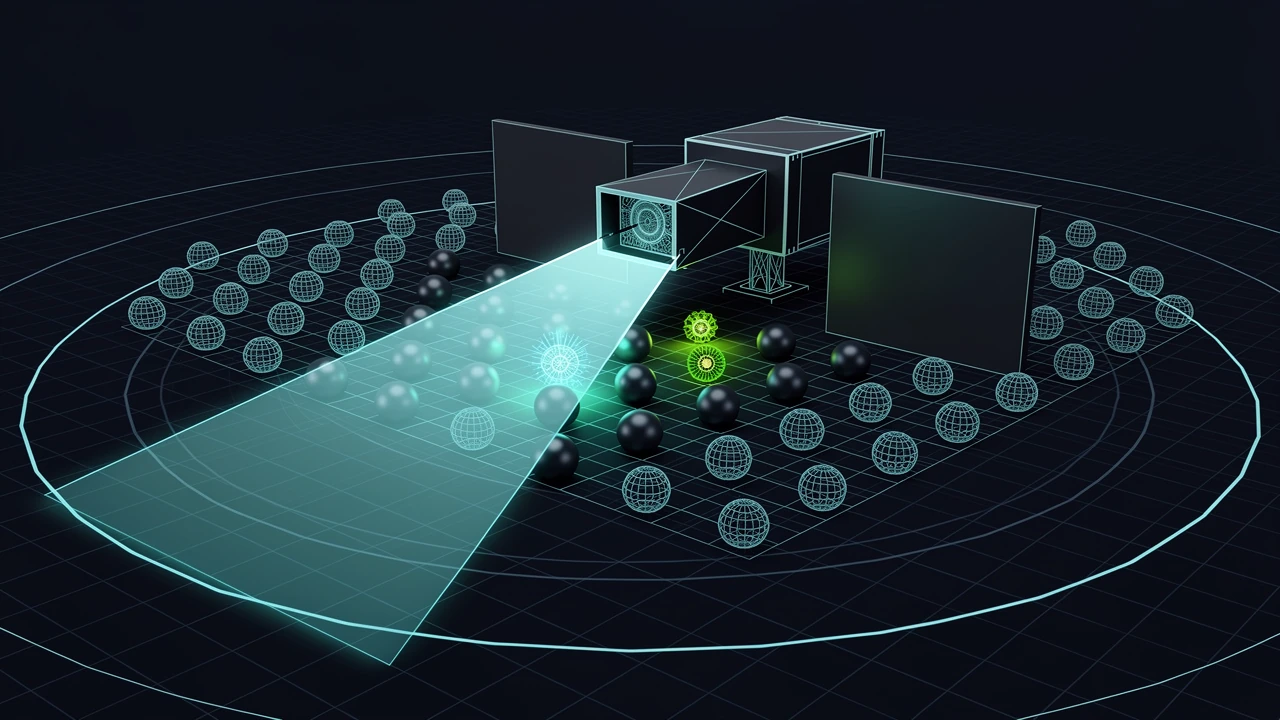
Unity’s CullingGroup API offers a useful middle ground between doing nothing and replacing the whole project with a custom spatial database. Give it bounding spheres, a camera, and a set of distance thresholds. Unity then reports when each sphere changes visibility or moves into another distance band. Gameplay code can use those changes to select a cheaper level of simulation.
The important correction is that CullingGroup does not manage objects. It supplies coarse visibility and distance information. The game still decides what “cheap,” “dormant,” and “visible” mean.
Culling renderers is only half the job
Unity already avoids drawing many objects outside the camera frustum. Static occlusion culling can also reject renderers hidden behind baked occluders. That saves rendering work, but it does not automatically settle every gameplay cost attached to those objects.
A disabled renderer does not imply that an AI planner, animation controller, IK pass, audio emitter, or custom Update method has stopped. Those systems have different correctness rules. An off-screen guard may still need to hear a sound. A distant animal may only need a cheap movement approximation. A hidden spawn point may be especially useful because spawning there will not visibly pop an enemy into existence.
This is where CullingGroup fits. It exposes information from Unity’s culling pipeline so non-rendering systems can make deliberate budget decisions too.
Typical uses include:
- reducing animation and AI quality for distant crowds
- pausing cosmetic effects when their area is not visible
- finding hidden spawn locations
- waking world objects when the player approaches
- replacing hundreds of per-object distance checks with one grouped query
- keeping only a lightweight data representation for distant agents
This is not a promise that every use will be faster. It is a way to move repeated visibility and proximity work into a purpose-built engine facility, then respond only when state changes.
The data model is intentionally coarse
A culling group works with an array of BoundingSphere values. Each sphere has a center and radius. There are no boxes, capsules, meshes, or arbitrary volumes.
That limitation is useful. A sphere is cheap to test and has no orientation. The tradeoff is an approximate fit. A tall building enclosed by one large sphere may count as visible when only empty space around its corners intersects the view. A long train may need several spheres if one enclosing sphere is too loose.
The group calculates two related results for every active sphere:
- Visibility relative to one target camera.
- A distance band relative to one reference point.
Visibility uses camera-frustum culling and static occlusion-culling information. Unity’s documentation is explicit that dynamic objects are not considered as occluders. A truck driving between the camera and an NPC does not make that NPC hidden as far as this API is concerned.
Distance is measured from the reference point to the closest point on the sphere, not simply to its center. Unity does not return the raw distance. It compares the result with thresholds supplied by the game and returns a discrete band.
Given thresholds of 20, 60, and 120 metres, the bands can be interpreted as:
- band 0: close
- band 1: medium
- band 2: far
- beyond the last threshold: outside the managed range
That quantization is a feature, not missing precision. Most gameplay budgeting does not need to know that an agent is exactly 47.38 metres away. It needs to know that the agent crossed from “full simulation” into “reduced simulation.”
Pick budgets before writing callbacks
The API is easier to use when the policy is defined first. Otherwise every callback grows a collection of unrelated toggles and exceptions.
A practical crowd policy might look like this:
| State | AI | Animation | Cosmetic effects |
|---|---|---|---|
| close and visible | full rate | full | enabled |
| close and hidden | full or reduced | disabled | disabled |
| medium | low-frequency decisions | visible agents only | disabled |
| far | coarse movement only | disabled | disabled |
| outside managed range | dormant record | disabled | disabled |
The exact table depends on the game. Multiplayer authority, audio propagation, combat, and deterministic simulation can all require work that visibility alone cannot switch off.
The useful pattern is to separate simulation significance from presentation visibility. Distance is often a reasonable input to simulation quality. Camera visibility is often a reasonable input to animation, particles, and other presentation work. Combining both into one SetActive(false) call is tempting and usually wrong.
A small working setup
The following component owns one culling group for a fixed set of agents. It updates sphere positions in LateUpdate and sends state changes back to each agent.
using UnityEngine;

public sealed class AgentCullingController : MonoBehaviour
{
    [SerializeField] private Camera targetCamera;
    [SerializeField] private Transform distanceReference;
    [SerializeField] private CullableAgent[] agents;
    [SerializeField] private float sphereRadius = 1.5f;
    [SerializeField] private float[] distanceBands = { 20f, 60f, 120f };

    private CullingGroup group;
    private BoundingSphere[] spheres;

    private void OnEnable()
    {
        if (targetCamera == null)
            targetCamera = Camera.main;

        if (targetCamera == null)
        {
            Debug.LogError("AgentCullingController needs a target camera.", this);
            enabled = false;
            return;
        }

        spheres = new BoundingSphere[agents.Length];
        for (int i = 0; i < agents.Length; i++)
            spheres[i] = new BoundingSphere(agents[i].transform.position, sphereRadius);

        group = new CullingGroup
        {
            targetCamera = targetCamera,
            onStateChanged = OnStateChanged
        };

        group.SetBoundingSpheres(spheres);
        group.SetBoundingSphereCount(spheres.Length);
        group.SetBoundingDistances(distanceBands);
        group.SetDistanceReferencePoint(
            distanceReference != null ? distanceReference : targetCamera.transform);
    }

    private void LateUpdate()
    {
        // CullingGroup keeps a reference to this array, so changing entries is enough.
        for (int i = 0; i < agents.Length; i++)
            spheres[i].position = agents[i].transform.position;
    }

    private void OnStateChanged(CullingGroupEvent evt)
    {
        agents[evt.index].ApplyBudget(evt.isVisible, evt.currentDistance);
    }

    private void OnDisable()
    {
        if (group == null)
            return;

        group.onStateChanged = null;
        group.Dispose();
        group = null;
    }
}
There are a few details worth keeping.
SetBoundingSpheres does not copy the array. The group retains a reference to it. Updating an existing sphere’s position therefore does not require calling SetBoundingSpheres again. This is both convenient and a reason not to replace or lose the array casually.
SetBoundingSphereCount tells Unity how much of the allocated array is active. The backing array can be larger than the current count. Unity recommends reserving enough capacity to avoid resizing at runtime, which is valuable for crowds and pooled objects.
The distance reference can be a Transform. That makes a player or camera rig a sensible source without manually pushing a new vector every frame. One group supports one reference point and one camera.
Finally, the group implements IDisposable. Creating it in OnEnable and disposing it in OnDisable gives the native resource an explicit lifetime. Skipping disposal is not an acceptable shortcut.
Keep the receiver boring
The receiver should apply a policy, not rediscover visibility. Here is a deliberately small example:
using UnityEngine;

public sealed class CullableAgent : MonoBehaviour
{
    [SerializeField] private MonoBehaviour expensiveAi;
    [SerializeField] private Animator animator;
    [SerializeField] private ParticleSystem cosmeticEffect;

    public void ApplyBudget(bool cameraVisible, int distanceBand)
    {
        // Close and medium agents can think; farther agents use a cheaper world model.
        if (expensiveAi != null)
            expensiveAi.enabled = distanceBand <= 1;

        // Presentation only matters when the camera can see it.
        if (animator != null)
            animator.enabled = cameraVisible && distanceBand <= 1;

        if (cosmeticEffect == null)
            return;

        bool shouldPlay = cameraVisible && distanceBand == 0;
        if (shouldPlay && !cosmeticEffect.isPlaying)
            cosmeticEffect.Play();
        else if (!shouldPlay && cosmeticEffect.isPlaying)
            cosmeticEffect.Stop(true, ParticleSystemStopBehavior.StopEmitting);
    }
}
This is an example policy, not a universal agent controller. Disabling an Animator can leave a character frozen in its current pose. That may be fine for an invisible agent but wrong when it becomes visible again, especially if root motion owns the transform. Disabling an AI behaviour may also discard timing assumptions.
Production code often replaces the booleans with explicit tiers such as Full, Reduced, PresentationOnly, and Dormant. Each subsystem can then decide what a tier means. The culling controller reports state; it does not become the owner of animation, AI, networking, and effects.
Callbacks are delayed state, not an immediate physics query
One of the easiest mistakes is to move a sphere and immediately ask the group for its new result.
Culling data is updated when Unity performs culling for the target camera. Until that happens, IsVisible, GetDistance, callbacks, and bulk query results describe the latest completed culling pass. Unity’s manual recommends treating the API asynchronously for this reason.
That has two consequences.
First, do not use CullingGroup for correctness decisions that require an answer at an exact instant. A melee hit test, line-of-sight shot, or security check needs physics, geometry, or authoritative game state. Camera culling is not a substitute.
Second, callbacks should tolerate a frame of delay. Simulation budgeting, effect control, crowd detail, and spawn-site filtering usually can. If a one-frame delay breaks the feature, the feature probably needs a different query.
The onStateChanged callback is efficient because it only reports transitions. It receives a CullingGroupEvent containing the sphere index, previous and current distance bands, visibility, and convenience flags such as hasBecomeVisible and hasBecomeInvisible.
Use those transition fields when setup and teardown differ:
private void OnStateChanged(CullingGroupEvent evt)
{
    if (evt.hasBecomeVisible)
        agents[evt.index].PreparePresentation();

    if (evt.hasBecomeInvisible)
        agents[evt.index].ReleasePresentation();

    if (evt.previousDistance != evt.currentDistance)
        agents[evt.index].SetSimulationBand(evt.currentDistance);
}
Heavy work should still be deferred. Loading an asset, instantiating a complex prefab, or rebuilding navigation state directly inside a burst of callbacks can merely move the hitch. Queue expensive transitions and process a limited number per frame.
Queries are useful when transitions are not enough
Callbacks are the normal choice for persistent state. Sometimes a system needs a snapshot instead.
A spawn director may ask for currently hidden candidates. A debug overlay may need every sphere in a particular distance band. A streaming controller may periodically reconcile its active set.
For those cases, the API provides IsVisible(index), GetDistance(index), and several QueryIndices overloads. A bulk query fills a caller-provided integer array with matching sphere indices.
private readonly int[] hiddenCandidates = new int[256];

private int FindHiddenCandidates(CullingGroup group)
{
    return group.QueryIndices(false, hiddenCandidates, 0);
}
The result buffer sets the maximum returned by that call. If more matches exist than the buffer can hold, continue from a later starting index or use a larger reusable buffer. Do not allocate a fresh array every time a spawn decision runs; that would turn a culling optimization into managed allocation churn.
Queries still return the last completed camera-culling results. They do not force an update.
Dynamic sets need stable ownership of indices
A fixed inspector array is enough for the first implementation. Pooled enemies, procedural props, and streaming worlds need registration and removal.
The sphere index becomes the identity passed through every event, so there must be a matching index-to-object table. A compact array or list works well. On removal, swap the final active entry into the removed slot, update both the sphere and object entry, reduce the active count, and call SetBoundingSphereCount.
That avoids shifting a large tail of elements:
remove index 3
move last active sphere and owner into index 3
decrement active count
update SetBoundingSphereCount(activeCount)
If outside code stores culling indices, the swap must also update that object’s stored handle. Better yet, keep indices private to the manager and expose an opaque registration handle.
There is one awkward edge case: a state-change event may already be pending for an index that is being recycled. A generation counter on each slot can prevent stale work from being applied to a newly registered object. Smaller projects can avoid that machinery by batching registration changes at a known point in the frame, after processing culling events.
Do not build a general-purpose handle allocator before the project needs dynamic membership. Start with a fixed set, measure the result, and add slot management when pooling or streaming makes it necessary.
One camera and one reference point are real constraints
A single CullingGroup evaluates one camera and one distance reference point. Split-screen, security cameras, minimap cameras, scene views, and spectator cameras complicate the policy.
Unity recommends using one group per camera when visibility must be evaluated from multiple cameras. Those groups can share the same bounding-sphere array because the array is referenced rather than copied. The game must then combine results, usually treating an object as visible if any relevant gameplay camera sees it.
Be careful about cameras that do not represent a player. A minimap camera should not necessarily wake full animation or AI across the whole map. Define which cameras participate in which budget decisions.
Distance has the same issue. A local co-op game may need the minimum band across two players, but one group only accepts one reference. Multiple groups or a separate distance system may be clearer.
At that point, a spatial hash, quadtree, ECS-based solution, or jobified distance pass can become the better tool. CullingGroup is valuable because it is narrow. Trying to hide its constraints behind a sprawling framework removes much of that value.
Common mistakes
Treating visibility as line of sight
Frustum and static occlusion results are not gameplay perception. Dynamic occluders are ignored, and an enclosing sphere is only an approximation. Use physics or a purpose-built visibility system when an AI must know whether it can actually see a target.
Deactivating the whole GameObject
SetActive(false) can stop scripts needed to wake the object, interrupt coroutines, alter pooling lifecycle, and disable colliders that remain important to gameplay. Disable or reduce expensive subsystems deliberately. If a fully dormant object must disappear, keep its lightweight record in a manager that remains active.
Updating every policy every frame
The point of onStateChanged is to react to transitions. Reapplying the same animation, AI, and particle settings each frame adds work and can restart systems accidentally.
Allocating exact-size arrays repeatedly
Reserve sphere capacity and reuse query result buffers. SetBoundingSphereCount exists so array capacity and active count can differ.
Using tiny distance thresholds without hysteresis
An object hovering around a threshold can bounce between bands. CullingGroup does not turn a noisy policy into a stable one. Choose bands with meaningful spacing, and add delayed promotion or hysteresis in the receiving policy when transitions trigger expensive work.
Assuming the callback is free
The visibility calculation may be grouped, but callback code still runs. A thousand objects crossing a threshold together can create a spike if each callback starts effects, allocates data, or loads content. Budget the transitions as carefully as the steady state.
Measure the result that matters
The success metric is not “fewer active GameObjects.” It is frame time and frame-time stability on target hardware.
Profile before and after with a representative scene. Look at script update time, animation, particles, rendering, and garbage collection. Test a camera cut or teleport that makes many spheres change state at once. Walk back and forth across distance thresholds. Verify split-screen and secondary-camera behaviour if they exist.
Also test correctness:
- Can off-screen AI still affect gameplay when required?
- Do agents resume in a valid state?
- Does an effect restart cleanly?
- Can an inactive spawn point become eligible?
- Are networked objects still simulated by the authority?
- Does a camera teleport produce a transition storm?
A culling policy that saves a millisecond but causes guards to forget the player is not an optimization. It is a gameplay bug with a good profiler screenshot.
Practical takeaway
Use CullingGroup when many objects need the same coarse answer: whether a camera can potentially see them and which distance tier they occupy.
Keep one owner for the group, its sphere array, and the index-to-object mapping. Reserve capacity, update sphere positions without replacing the array, react to state changes instead of polling every object, and dispose the group with its owner. Let distance choose simulation quality and visibility choose presentation where that split matches the game.
Most importantly, treat the result as a budget signal rather than truth. It is not line of sight, physics, networking authority, or exact distance. It is a cheap way to stop spending full price on objects the player cannot currently notice.
That narrow job is enough to make it useful.
References
- Unity Manual: Introduction to the CullingGroup API
- Unity Manual: Create a Culling Group
- Unity Manual: Get culling results
- Unity Scripting API: CullingGroup
- Unity Scripting API: CullingGroupEvent
- Unity Scripting API: CullingGroup.QueryIndices