6 minutes
Cancellation Tokens in Unity: Stopping Async Work Before It Outlives the Scene
If the last post was about waiting in Unity without turning the main thread into a junk drawer, this one is about what happens when the wait should stop.
That is the part people skip until it hurts. A loading screen closes, a scene unloads, a menu gets backed out of, and some async flow keeps running anyway. A few seconds later, the code is still trying to touch an object that no longer exists. The bug usually shows up as a random exception, a stuck spinner, or a callback that arrives long after the player has moved on.
Cancellation tokens are the boring fix. They do not make async code faster, and they do not magically kill arbitrary work. They just give every step in the flow a shared signal that says, “this no longer matters.” That is exactly what Unity code needs when lifetime and timing are part of the problem.
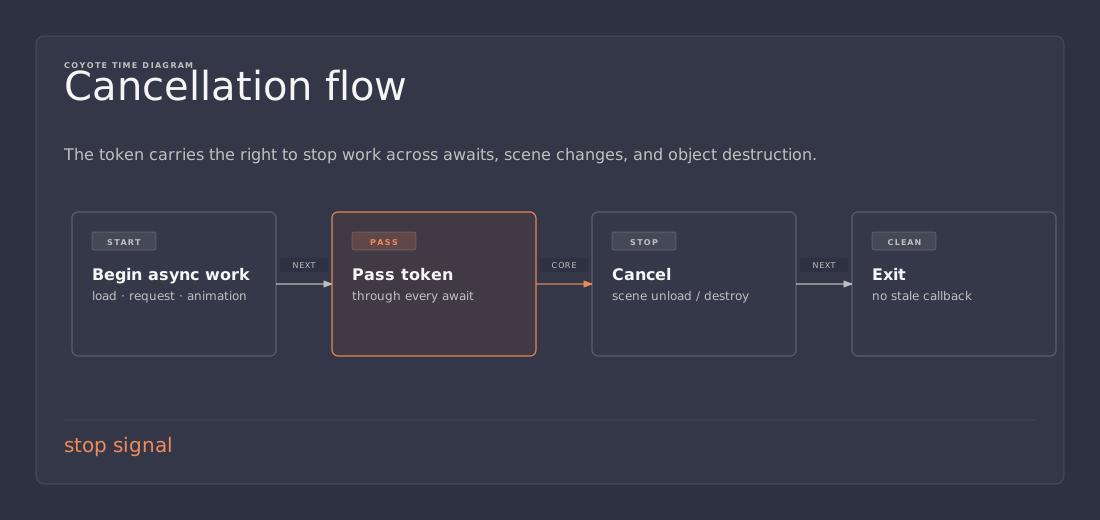
What a cancellation token actually does
A cancellation token is not a stop button in the dramatic sense. It is a lightweight signal.
Any method that accepts a CancellationToken can check whether cancellation has been requested and decide what to do next. That usually means one of three things:
- return early before doing more work
- stop awaiting the next async step
- throw
OperationCanceledExceptionso the caller can unwind cleanly
That sounds small, but small is the point. Most Unity bugs around cancellation are not about one giant task. They are about several tiny steps that were written as if the object would always still be there.
scene / object lifetime
        │
        ├── user leaves menu
        ├── object gets destroyed
        └── scene changes
                 │
                 ▼
        cancellation token is signaled
                 │
                 ▼
        async flow stops at the next check
Why this matters in Unity
Unity code lives inside lifetimes. A MonoBehaviour can be destroyed. A scene can unload. A UI panel can be hidden. A player can cancel a load screen and move somewhere else.
If the async work keeps going after that, you usually get one of these outcomes:
- stale UI updates
- exceptions from dead objects
- work that wastes time after the result no longer matters
- a flow that is hard to reason about because the cause and effect are no longer attached
That is why cancellation is not an optional cleanup feature. It is part of the control flow.
If the object that started the work is gone, the work should usually go with it.
The default pattern I use
I try to keep the rule simple: create or receive a token at the edge, then pass it all the way through.
In UniTask projects, I usually start from the object lifetime token:
using System;
using System.Threading;
using Cysharp.Threading.Tasks;
using UnityEngine;

public sealed class ProfilePanel : MonoBehaviour
{
    [SerializeField] private GameObject loadingSpinner;

    private void OnEnable()
    {
        RefreshAsync(this.GetCancellationTokenOnDestroy()).Forget();
    }

    private async UniTask RefreshAsync(CancellationToken token)
    {
        loadingSpinner.SetActive(true);

        try
        {
            var profile = await LoadProfileAsync(token);
            token.ThrowIfCancellationRequested();
            ShowProfile(profile);
        }
        catch (OperationCanceledException)
        {
            // Expected when the panel is closed or the scene changes.
        }
        finally
        {
            if (this != null)
            {
                loadingSpinner.SetActive(false);
            }
        }
    }

    private static async UniTask<string> LoadProfileAsync(CancellationToken token)
    {
        await UniTask.Delay(TimeSpan.FromSeconds(1), cancellationToken: token);
        return "Player One";
    }

    private void ShowProfile(string profile)
    {
        // Update Unity objects here.
    }
}
The pattern is boring on purpose.
- the UI turns on before the wait starts
- the token is threaded through the whole flow
- cancellation is treated as normal control flow
- cleanup happens in
finally
That is enough for most game UI and loading code.
Cancellation only works if you pass the token
This is the part that gets missed most often.
A token only helps if the async method actually observes it. If you create the token and then forget to pass it into the awaited work, you have written a note to yourself and called it safety.
That means this is good:
await UniTask.Delay(500, cancellationToken: token);
await request.SendAsync(token);
await LoadSomethingAsync(token);
And this is not enough:
await UniTask.Delay(500);
await request.SendAsync();
await LoadSomethingAsync();
If the API you are calling does not accept a token, cancellation can only happen between steps. That is still useful, but it is weaker than full propagation.
That is also why I like to make the token part of the method signature instead of hiding it in a field. If a method depends on cancellation, the signature should say so.
User cancel and lifetime cancel are usually different things
A UI flow often needs more than one reason to stop.
The object might disappear because the player left the screen. Or the player might press a cancel button while the object is still alive. Those are different sources of cancellation, but they should usually end up in the same flow.
That is where linked tokens help:
using System;
using System.Threading;
using Cysharp.Threading.Tasks;
using UnityEngine;

public sealed class DownloadDialog : MonoBehaviour
{
    [SerializeField] private GameObject spinner;

    private CancellationTokenSource? _userCancelSource;

    private void OnEnable()
    {
        _userCancelSource = new CancellationTokenSource();
        RunAsync(_userCancelSource.Token, this.GetCancellationTokenOnDestroy()).Forget();
    }

    private async UniTask RunAsync(CancellationToken userToken, CancellationToken destroyToken)
    {
        using var linked = CancellationTokenSource.CreateLinkedTokenSource(userToken, destroyToken);
        var token = linked.Token;

        spinner.SetActive(true);

        try
        {
            await UniTask.Delay(TimeSpan.FromSeconds(3), cancellationToken: token);
            token.ThrowIfCancellationRequested();
        }
        catch (OperationCanceledException)
        {
            // Either the user canceled or the dialog went away.
        }
        finally
        {
            if (this != null)
            {
                spinner.SetActive(false);
            }
        }
    }

    public void CancelPressed()
    {
        _userCancelSource?.Cancel();
    }

    private void OnDisable()
    {
        _userCancelSource?.Dispose();
        _userCancelSource = null;
    }
}
That pattern gives the flow two exit ramps:
- one for the player
- one for the object lifetime
The work stops when either one says it should.
The mistakes I try to avoid
Cancellation is easy to get mostly right and still leave sharp edges behind.
The common mistakes are:
- swallowing cancellation and pretending the flow finished normally
- creating a
CancellationTokenSourceand never disposing it - passing the token into some calls but not others
- using cancellation as a substitute for proper error handling
- assuming cancellation will interrupt work that never checks the token
The last one matters most. Cancellation is cooperative. It works because your code checks the signal at sensible points.
That is not a weakness. It is what keeps cancellation predictable.
A simple rule of thumb
If an async flow belongs to an object, ask two questions:
- should this stop when the object dies?
- should this also stop when the player cancels the action?
If the answer to either one is yes, make the token part of the flow from the start.
If the answer is no, the work probably does not belong in that object in the first place.
Practical takeaway
Cancellation tokens do not make Unity async code clever. They make it honest.
They tell you which work still matters, keep stale results from leaking into the wrong scene, and make cancellation part of the design instead of an afterthought.
If the previous post was about waiting cleanly, this one is about stopping cleanly.
References
- Follow-up to Async in Unity with UniTask: Waiting Without Turning the Main Thread into a Junk Drawer
- Unity Scripting API, CancellationTokenSource
- Unity Manual, Await support
- Cysharp, UniTask GitHub repository