14 minutes
Factory and Abstract Factory Patterns: Create the Thing Without Spreading the Choice Everywhere
Factory patterns are useful when object creation has a decision hiding inside it.
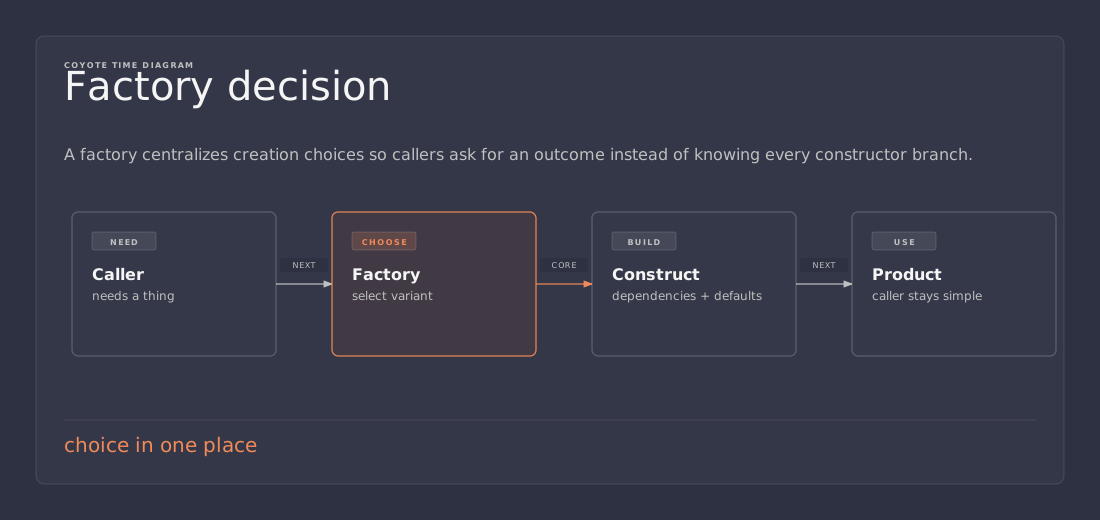
That is the whole reason to care. Not because every new keyword needs a wrapper. Not because design pattern diagrams look tidy. A factory earns its place when code needs to choose which concrete thing to build, prepare it correctly, and keep that choice from leaking into every caller.
Game projects hit that shape constantly. A loot table creates different item instances from the same reward roll. A spawn system creates enemies from data. A UI flow creates screens from route names. A VFX system creates pooled effects from effect ids. A save loader creates versioned objects from older data. A network layer creates messages from packet types. The caller wants to say “give me the thing for this situation.” It should not need to know every concrete class, every prefab, every dependency, and every setup rule involved.
A factory gives creation a small home.
The trap is that “factory” sounds more important than it is. Most useful factories are boring. Many are one method. Some are just a dictionary from id to prefab. A few become full abstract factories. The work is deciding which size of factory fits the problem.
The small version: a factory method
The simplest factory is a method that returns an object.
public Projectile CreateProjectile(ProjectileId id, Vector3 position, Quaternion rotation)
{
    var prefab = projectileCatalog.GetPrefab(id);
    return Object.Instantiate(prefab, position, rotation);
}
That is already a factory. It does not need a suffix. It does not need an interface. It does not need a base class. It has one job: centralize the lookup and construction rule.
This is often enough for Unity code. If a weapon, enemy spawner, or UI controller needs to create something by id, the factory can hide where the prefab lives and how the object is initialized. The caller does not need to reach into addressables, resources, a serialized array, or a scene registry.
public sealed class EnemySpawner
{
    private readonly EnemyFactory enemyFactory;

    public EnemySpawner(EnemyFactory enemyFactory)
    {
        this.enemyFactory = enemyFactory;
    }

    public Enemy Spawn(EnemySpawnRequest request)
    {
        var enemy = enemyFactory.Create(request.EnemyId, request.Position);
        enemy.SetLevel(request.Level);
        enemy.SetPatrolRoute(request.PatrolRoute);
        return enemy;
    }
}
The spawner still owns spawn behavior. The factory owns creation. That boundary is small, which is why it works.
A good factory method usually answers three questions:
- Which concrete type or asset should be used?
- Which dependencies or defaults must be applied?
- Which setup rules should happen before the caller receives the object?
If the method does not answer one of those questions, it may not need to exist.
Factories are not anti-constructors
The existence of factories does not make constructors bad.
A constructor is still the best place to require the dependencies and values an object must have before it can be valid.
public sealed class DamagePopupPresenter
{
    private readonly DamagePopupView view;
    private readonly ColorPalette palette;

    public DamagePopupPresenter(DamagePopupView view, ColorPalette palette)
    {
        this.view = view;
        this.palette = palette;
    }
}
That type does not need a factory just because it has a constructor. The constructor is clear. The required values are obvious. There is no hidden choice.
A factory starts to help when the construction process needs information the caller should not own.
public DamagePopupPresenter Create(DamageType damageType)
{
    var view = viewPool.Get();
    var palette = palettes.ForDamageType(damageType);
    return new DamagePopupPresenter(view, palette);
}
Now the factory is buying something. It hides pooling, lookup, and palette selection. The caller only knows it wants a popup for a damage type.
This is the pattern at its healthiest: move creation policy out of gameplay code, but leave normal object invariants inside constructors.
The switch statement smell
The common factory smell is a switch statement that appears in too many places.
switch (enemyType)
{
    case EnemyType.Grunt:
        return Object.Instantiate(gruntPrefab);
    case EnemyType.Sniper:
        return Object.Instantiate(sniperPrefab);
    case EnemyType.Heavy:
        return Object.Instantiate(heavyPrefab);
    default:
        throw new ArgumentOutOfRangeException(nameof(enemyType));
}
This switch is not automatically bad. One switch in one factory is fine. A switch is often the simplest honest expression of a closed set of choices.
The problem starts when the same decision spreads:
- the spawn system switches on enemy type
- the UI switches on enemy type to choose an icon
- the audio system switches on enemy type to choose a bark set
- the save loader switches on enemy type to restore runtime data
- the tutorial system switches on enemy type to display help
At that point, the enum is no longer just a value. It has become a distributed construction policy. Every new enemy type means hunting for branches across the codebase.
A factory can pull at least the creation part back into one place.
public sealed class EnemyFactory
{
    private readonly IReadOnlyDictionary<EnemyType, EnemyDefinition> definitions;
    private readonly IServiceProvider services;

    public EnemyFactory(
        IReadOnlyDictionary<EnemyType, EnemyDefinition> definitions,
        IServiceProvider services)
    {
        this.definitions = definitions;
        this.services = services;
    }

    public Enemy Create(EnemyType type, Vector3 position)
    {
        if (!definitions.TryGetValue(type, out var definition))
            throw new ArgumentException($"Unknown enemy type: {type}", nameof(type));

        var enemy = Object.Instantiate(definition.Prefab, position, Quaternion.identity);
        enemy.Initialize(definition.Stats, services.Get<IAggroService>());
        return enemy;
    }
}
The caller no longer cares which prefab belongs to EnemyType.Heavy. It asks the factory. The factory becomes the single place where enemy creation policy lives.
Notice the ceiling, though. If every behavior still switches on enemy type somewhere else, a factory does not solve that. It only solves construction. Strategy, data-driven definitions, or polymorphism may be the right next step. Do not ask a factory to fix the whole architecture.
Factory Method versus Factory class
The named Factory Method pattern is usually described with inheritance: a base class defines a creation method, and subclasses decide which concrete product to return.
public abstract class EncounterBuilder
{
    public Encounter Build(Vector3 location)
    {
        var enemies = CreateEnemies(location);
        var reward = CreateReward();
        return new Encounter(enemies, reward);
    }

    protected abstract IReadOnlyList<Enemy> CreateEnemies(Vector3 location);
    protected abstract Reward CreateReward();
}
That shape can be useful, but game code should not reach for inheritance first. Unity already brings enough inheritance and engine lifecycle into the room.
A plain factory class is often easier to test, easier to wire, and easier to replace.
public interface IEncounterFactory
{
    Encounter Create(EncounterDefinition definition, Vector3 location);
}
That interface is boring in the right way. The implementation can use prefabs, object pools, addressables, procedural generation, or test doubles. The caller does not care.
The lazy rule is simple: if the creation decision varies by runtime data, use a normal factory object. If the creation decision is naturally tied to a family of subclasses that already exists, Factory Method can fit. Do not create an inheritance tree just to make the pattern diagram happy.
Abstract factory: families, not one object
An abstract factory creates a family of related objects that are meant to work together.
That phrase matters: family of related objects.
A single projectile factory is not an abstract factory. A UI theme factory that creates matching buttons, panels, tooltips, and icons can be. A platform factory that creates matching input prompts, save adapters, entitlement clients, and store links can be. A game mode factory that creates matching rules, scoring, HUD, and AI director can be.
public interface IGameModeFactory
{
    IScoreRules CreateScoreRules();
    ISpawnDirector CreateSpawnDirector();
    IMatchHud CreateHud();
    IRewardTable CreateRewards();
}
The point is not that each method is hard. The point is that the returned objects must agree with each other.
public sealed class TimeTrialFactory : IGameModeFactory
{
    public IScoreRules CreateScoreRules() => new TimeTrialScoreRules();
    public ISpawnDirector CreateSpawnDirector() => new GhostSpawnDirector();
    public IMatchHud CreateHud() => new TimerHud();
    public IRewardTable CreateRewards() => new MedalRewardTable();
}

public sealed class SurvivalFactory : IGameModeFactory
{
    public IScoreRules CreateScoreRules() => new SurvivalScoreRules();
    public ISpawnDirector CreateSpawnDirector() => new WaveSpawnDirector();
    public IMatchHud CreateHud() => new WaveHud();
    public IRewardTable CreateRewards() => new LootCrateRewardTable();
}
A match bootstrapper can now receive one factory and create a consistent set of systems.
public sealed class MatchBootstrapper
{
    public MatchRuntime Build(IGameModeFactory factory)
    {
        return new MatchRuntime(
            factory.CreateScoreRules(),
            factory.CreateSpawnDirector(),
            factory.CreateHud(),
            factory.CreateRewards());
    }
}
That is the useful version of abstract factory. It prevents mismatched combinations. A survival HUD does not accidentally get paired with time-trial scoring because both came from the same family factory.
Where abstract factories go wrong
Abstract factories become painful when the family is imaginary.
public interface IEverythingFactory
{
    Player CreatePlayer();
    Enemy CreateEnemy();
    Weapon CreateWeapon();
    Quest CreateQuest();
    Inventory CreateInventory();
    SaveSystem CreateSaveSystem();
}
That is not a family. That is a service locator with a nicer coat.
The interface is too broad. It gives unrelated systems one shared dependency for no real reason. Any implementation now has to understand half the project, and tests that need one object may have to stub ten methods. That is not flexibility. That is a junk drawer.
A useful abstract factory should have a narrow theme:
- all products belong to one feature area
- all products must be consistent with each other
- callers usually need several products together
- swapping the factory changes a coherent mode, platform, theme, or backend
If those rules do not hold, use smaller factories.
Data-driven factories in Unity
Unity factories often combine code with data assets.
A ScriptableObject catalog is a good fit when designers need to choose assets and tune values without editing code.
[CreateAssetMenu(menuName = "Game/Enemy Catalog")]
public sealed class EnemyCatalog : ScriptableObject
{
    [SerializeField] private EnemyDefinition[] enemies;

    private Dictionary<EnemyId, EnemyDefinition>? lookup;

    public EnemyDefinition Get(EnemyId id)
    {
        lookup ??= enemies.ToDictionary(enemy => enemy.Id);

        if (!lookup.TryGetValue(id, out var definition))
            throw new ArgumentException($"Unknown enemy id: {id}", nameof(id));

        return definition;
    }
}
Then the factory uses the catalog.
public sealed class EnemyFactory
{
    private readonly EnemyCatalog catalog;
    private readonly EnemyPool pool;

    public EnemyFactory(EnemyCatalog catalog, EnemyPool pool)
    {
        this.catalog = catalog;
        this.pool = pool;
    }

    public Enemy Create(EnemyId id, Vector3 position)
    {
        var definition = catalog.Get(id);
        var enemy = pool.Get(definition.Prefab);
        enemy.transform.position = position;
        enemy.Initialize(definition.Stats, definition.BehaviorProfile);
        return enemy;
    }
}
This keeps Unity-specific asset selection near the edge. Gameplay code can talk in ids and requests instead of serialized arrays and prefab references.
The important detail is validation. A data-driven factory should fail loudly when data is missing, duplicated, or invalid. Silent fallback enemies and null prefabs are how production bugs become ghost stories.
A small editor validation pass or OnValidate check is usually enough:
private void OnValidate()
{
    var seen = new HashSet<EnemyId>();

    foreach (var enemy in enemies)
    {
        if (enemy.Prefab == null)
            Debug.LogError($"Enemy {enemy.Id} has no prefab", this);

        if (!seen.Add(enemy.Id))
            Debug.LogError($"Duplicate enemy id: {enemy.Id}", this);
    }
}
The factory should be boring at runtime because the data was checked before runtime.
Pools are factories with memory
Object pools and factories often meet, but they are not the same thing.
A factory decides how to create or acquire an object. A pool decides how to reuse object instances. In Unity, a factory may use a pool internally because instantiating prefabs during gameplay can be expensive.
public Projectile Create(ProjectileRequest request)
{
    var projectile = projectilePool.Get(request.ProjectileId);
    projectile.transform.SetPositionAndRotation(request.Origin, request.Rotation);
    projectile.Initialize(request.Owner, request.Damage, request.Speed);
    return projectile;
}
The caller should not need to know whether the projectile came from Instantiate, an addressable load, or a warm pool. That is creation policy.
But the factory should not hide object lifetime rules. If callers must return objects to a pool, make that contract visible.
public interface IProjectileFactory
{
    Projectile Create(ProjectileRequest request);
    void Release(Projectile projectile);
}
That is less pretty than a one-way Create method, but it is honest. Lifetime is part of the API. Hiding it creates leaks, double releases, and spooky reuse bugs.
Factories and dependency injection
Factories pair well with dependency injection when objects are created after startup.
A composition root can build long-lived services at the edge of the program. That works for systems that exist for the lifetime of a scene or match. It does not solve runtime creation by itself. Enemies, bullets, popups, commands, and temporary view models are created later.
That is where a factory is useful: inject the factory into the system that needs runtime objects.
public sealed class Weapon
{
    private readonly IProjectileFactory projectileFactory;

    public Weapon(IProjectileFactory projectileFactory)
    {
        this.projectileFactory = projectileFactory;
    }

    public void Fire(FireRequest request)
    {
        projectileFactory.Create(new ProjectileRequest(
            request.ProjectileId,
            request.Origin,
            request.Rotation,
            request.Owner));
    }
}
The weapon is not responsible for prefab lookup, pooling, addressables, or projectile dependencies. It only knows how to ask for a projectile.
This is also where service locators sneak in. A factory that reaches into a global container for everything can become hard to reason about.
// Usually a smell inside runtime code.
var audio = ServiceLocator.Get<IAudioService>();
var stats = ServiceLocator.Get<IStatsService>();
var pool = ServiceLocator.Get<IProjectilePool>();
Prefer giving the factory its dependencies through its constructor. If the factory needs a pool, catalog, random source, or clock, make that visible when the factory is built. Runtime callers should pass runtime data, not global access requests.
A practical decision guide
Factories are easiest to size by starting with the smallest thing that could work.
Use a constructor when:
- the type has fixed required dependencies
- there is no concrete-type selection
- setup is simple and local
- the caller already has the values it needs
Use a static helper or simple method when:
- construction is mostly mechanical
- there is one obvious output type
- the helper has no meaningful state
- test replacement is not important
Use a factory class when:
- creation depends on runtime data
- construction uses catalogs, pools, prefabs, or external services
- several callers need the same creation rule
- invalid creation should be validated in one place
- tests need to replace creation with a fake
Use an abstract factory when:
- several related products must be created together
- those products must belong to the same family
- swapping the factory swaps a coherent mode, platform, theme, or backend
- the caller should not mix products from different families
Do not use a factory when:
- it only wraps
newwith no added policy - the name exists only to satisfy a pattern checklist
- every method returns an unrelated system
- a data table or object initializer would be clearer
- the factory hides lifetime rules that callers still need to respect
The factory should make construction easier to trust. If it only makes construction harder to find, it failed.
The testability angle
Factories are useful in tests because creation is a side effect.
Instantiating Unity prefabs, loading assets, asking addressables for data, or touching pools can make unit tests heavy. A small factory interface lets gameplay code be tested without dragging the engine into every check.
public sealed class FakeProjectileFactory : IProjectileFactory
{
    public readonly List<ProjectileRequest> Requests = new();

    public Projectile Create(ProjectileRequest request)
    {
        Requests.Add(request);
        return null!;
    }

    public void Release(Projectile projectile)
    {
    }
}
Now a weapon test can verify intent:
weapon.Fire(request);

Assert.That(fakeFactory.Requests, Has.Count.EqualTo(1));
Assert.That(fakeFactory.Requests[0].ProjectileId, Is.EqualTo(expectedId));
That test does not prove the projectile prefab works. It proves the weapon asks for the right thing. The factory itself can have a smaller integration test that verifies catalogs, prefabs, pools, and initialization.
That separation is valuable. The game system test stays fast. The Unity integration test checks the Unity edge.
Keep the boundary honest
A factory sits at a boundary. That means it should be explicit about what crosses the boundary.
Good inputs are usually request objects, ids, definitions, positions, owners, or mode choices.
public readonly record struct EnemySpawnRequest(
    EnemyId EnemyId,
    Vector3 Position,
    int Level,
    PatrolRoute? PatrolRoute);
Bad inputs are often giant bags of unrelated state.
public Enemy Create(GameManager manager)
That factory can now pull anything from anywhere. It is flexible in the same way a junk drawer is flexible. The caller no longer knows what creation depends on, and the factory can grow invisible coupling forever.
A factory request should say what the new object needs, not hand over the whole game.
The same applies to outputs. Return the narrowest useful type. If callers only need an interface, return the interface. If Unity code needs the concrete component for setup, return the component. Do not force abstraction where the engine boundary needs a concrete object.
The boring final shape
A good factory is not dramatic. It is a named seam around creation policy.
It keeps prefab lookup out of gameplay logic. It keeps data validation near the catalog. It keeps object pooling behind a clear API. It keeps runtime object creation testable. It keeps abstract families consistent when several related systems need to be swapped together.
The pattern is worth using when construction has real rules. It is not worth using when construction is already obvious.
That is the lazy version: create the thing directly until the choice starts spreading. Then put the choice in one small place. If several related choices must move together, make that place an abstract factory. Stop there. The goal is not to collect patterns. The goal is to keep creation code from leaking all over the game.
Related reading: Combining Reflex DI with Factories continues this idea with a concrete Unity dungeon-room example using Reflex as the DI container. Builder and Fluent Builder Patterns covers complex object setup after the creation choice has already been made. Strategy Pattern in Games covers swapping behavior after an object exists. Dependency Injection for Game Code covers keeping long-lived wiring at the edges instead of letting runtime code hunt for dependencies.