10 minutes
Hierarchical State Machines in Unity: Keep the Top Level Boring

I reach for a finite state machine when a system has clear modes and clear transitions.
That works well until the graph starts to copy itself. A flat state machine is fine for a small character controller, a menu, or a short AI loop. Then the shared rules show up: pause input, damage reactions, locomotion, weapon handling, animation, camera control. At that point the machine is no longer just a machine. It is a pile of repeated rules with arrows drawn between them.
Hierarchical state machines solve that by letting a state own other states. The parent handles shared behavior. The child handles the part that is specific.
That sounds small. In practice it saves a lot of code.
Why I bother with hierarchy at all
The basic reason is transition count.
If every state needs to know about every other state, the graph grows fast. A few states are fine. A dozen starts to hurt. What really gets ugly is not the number of states by itself, it is the number of special cases that keep leaking across them.
A hierarchy lets me move repeated rules upward.
Instead of this:
GroundedIdleGroundedRunGroundedAimAirborneJumpAirborneFallAirborneAimClimbingIdleClimbingMove
I can split the machine into layers:
ExplorationGroundedAirborneClimbing
CombatAimingAttackingRecovering
The parent owns the shared rules for a mode. The child owns the specifics. If I need to change what happens when the player is in exploration mode, I do it once instead of three or four times.
That is the real win: fewer places to forget.
The shape I keep in my head
Here is the simplest useful model.
- A state can handle an event or ignore it.
- If the state ignores it, the parent gets a chance.
- If the child state does not need special setup or teardown, the parent can do it.
- If several children share a default, that default belongs in the parent.
That last point is the one that saves code.
A hierarchical machine is not just a way to make the graph look tidy. It is a way to define ownership.
The child owns the exact behavior. The parent owns the fallback. The machine owns the transition.
That separation is what makes the design work.
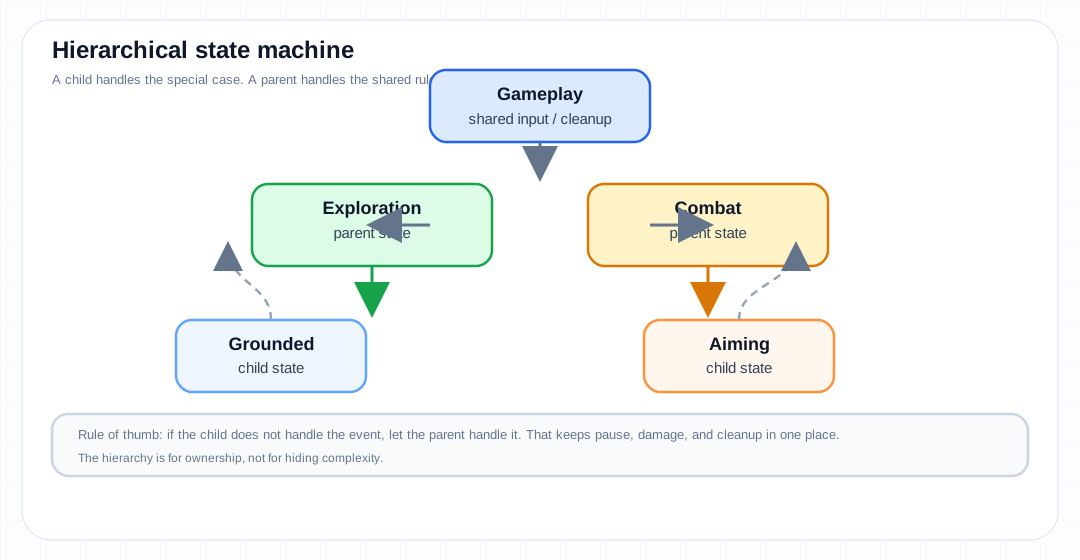
The diagram above is the version I keep reaching for in player code: a small top-level mode, a couple of nested substates, and a clear rule for what happens when a child state does not know how to handle something.
A useful Unity rule: gameplay logic and animation logic are not the same thing
Unity already gives me state machines in the Animator. It also gives me sub-state machines, entry transitions, and exit transitions, which is a nice editor-side way to group related animation states.
That part is useful.
But I do not want to confuse the animation graph with the game rules.
Animation can reflect the current mode. Gameplay should decide the current mode. If I mix the two, I end up with animation states quietly controlling things that should have been explicit in code.
I prefer to keep the gameplay state machine in plain C# and let the Animator follow along. The Animator is good at presentation. It is not the right place for the whole game loop to hide.
Unity’s own manual makes the same structural point in a different context: nested state machines are there to group related states and keep a large controller manageable. That is the same reason I use hierarchy in code. The editor feature is not the design. It is just one place the design shows up.
How I model the parent-child relationship
I keep the code boring on purpose.
A child state needs to do two jobs:
- handle its own behavior
- fall back to the parent when it does not care about an event
That can be as simple as this:
public interface IState
{
    void Enter();
    void Tick(float dt);
    bool Handle(GameEvent evt);
    void Exit();
}

public abstract class State : IState
{
    protected readonly State? Parent;

    protected State(State? parent)
    {
        Parent = parent;
    }

    public virtual void Enter() { }
    public virtual void Tick(float dt) { }
    public virtual void Exit() { }

    public virtual bool Handle(GameEvent evt)
        => Parent?.Handle(evt) ?? false;
}
A child overrides Handle when it has a special case.
If it does not, the event keeps moving up.
That is the important part. I do not need a giant switch statement in the leaf state to keep re-implementing the same pause key, the same damage flash, or the same movement lock.
A parent can catch those once.
A player controller example
The clearest place I have used this is a player controller.
At the top level, I usually care about a few broad modes:
ExplorationCombatUIBlockedDead
Those modes change the rules in a way the rest of the game can feel. In Exploration, movement is free, camera control is normal, and the player can interact with the world. In Combat, the camera may change, input may be narrower, and the weapon rules matter. In UIBlocked, most of the game should stop listening except for menu navigation. In Dead, almost everything is a no-op.
Inside Exploration, I can keep the lower-level movement split separate:
GroundedAirborneClimbingSwimming
Inside Combat, I can split by action:
AimingFiringReloadingRecovering
Those child states all share the same parent rules.
For example, Aiming and Firing may both allow the same pause input. Grounded and Airborne may both use the same footstep sound handling or camera bob reset. Climbing and Swimming may both ignore jump buffering and use a different gravity rule.
If I do not have hierarchy, each of those child states ends up carrying copies of the shared logic. That is where maintenance gets expensive. I do not want to debug the same input rule in four places because the state graph was flat and looked harmless at the time.
Shared defaults belong in the parent
This is where a lot of state machine code gets messy.
A child should not carry code that is obviously common to its siblings. If three states all react to damage the same way, damage belongs one level higher.
That usually means these things want to live in the parent:
- shared animation parameters
- shared input locks
- shared movement restrictions
- shared camera defaults
- shared audio cues
- shared exit cleanup
The parent is the place for the default response. The child is the place for the exception.
That boundary keeps me honest. If I find myself copying the same code into several sibling states, I usually stop and ask whether the rule is actually a parent rule.
Most of the time it is.
Let unhandled events bubble upward
The nicest part of a hierarchical machine is also the part that saves me the most time: unhandled events can bubble up.
If the child does not know what to do with an input, the parent gets the chance to decide.
That sounds trivial, but it is what makes the machine feel layered instead of duplicated. A Grounded state does not need to know how to pause the game if Exploration already knows that. A Reloading state does not need to know how to show the inventory overlay if Combat or PlayerRoot already handles it.
That means I can add a new child state without re-implementing every global rule.
This is also where hierarchy differs from a pure “one big switch” approach. In a switch, every case tends to become responsible for everything. In a hierarchy, responsibility has a path.
That path is the design.
Enter and exit need to be predictable
Once the graph has parents, entry and exit matter more.
I want to be strict about this:
- entering a parent should set up shared state only once
- entering a child should set up child-specific state only
- exiting a child should undo only child-specific state
- exiting a parent should clean up the shared state it owns
If I get sloppy here, the hierarchy becomes fragile very quickly. The bug usually looks like a state that enters correctly the first time and then behaves oddly after a couple of transitions because some shared value was not reset where it should have been.
That is why I prefer a machine that owns the current path and computes the transition deliberately instead of letting every state manually poke at siblings.
If the machine changes from Exploration.Grounded to Combat.Aiming, I want the transition to know what part of the path is shared, what part needs to exit, and what part needs to enter.
A state should not have to guess.
Where Unity’s built-in tools fit
I do use Unity’s Animator hierarchy for animation when it makes sense.
A sub-state machine is good when the animation graph itself has a clear internal structure. A locomotion group is not the same as a combat group. A menu animation set is not the same as a character locomotion set. Grouping those in the editor makes the controller easier to read.
Unity’s documentation on animation state machines, nested state machines, and state machine transitions is useful here because it shows the same logic at the animation layer: group related states, use entry and exit transitions to keep the graph readable, and do not let one giant controller turn into a tangle.
That said, I still keep the real gameplay decisions in code.
I have seen too many projects let the Animator become the hidden source of truth. The result is usually a system that looks fine in the editor but is miserable to debug when someone asks, “Why did the player stop accepting input?”
I want gameplay logic in code and animation as a follower. That split keeps the bug surface smaller.
When I do not use a hierarchy
Hierarchical state machines are useful, but they are not free.
I do not reach for one when:
- the machine only has a few states
- the shared behavior is tiny
- the system is really two independent systems, not one nested one
- the hierarchy would hide a design problem instead of solving it
If I only have three states, a flat machine is usually easier. If I have locomotion and weapon selection and UI focus all tangled together, hierarchy may not be the real fix. Separate machines or composition may be cleaner.
This matters because hierarchy can look elegant while still being wrong. It is very easy to make the tree pretty and still have the architecture be confused.
A hierarchy is good when it expresses real ownership. It is bad when it is used as a dustbin for extra states.
A practical rule of thumb
I start flat.
When I see repeated transitions, repeated shared rules, or repeated cleanup, I split the machine into a parent state and a set of children.
If the parent stays small and boring, the split was probably the right move.
If the parent starts turning into a second monster, I stop and look for a different boundary. Sometimes the problem is not that I need a deeper state machine. Sometimes the problem is that I need two machines, or a separate component, or a simpler rule altogether.
That is usually the right question to ask in game code: am I building structure, or am I only moving complexity around?
Takeaway
Hierarchical state machines are worth using when several states share the same rules and the flat graph is starting to duplicate itself.
Use the parent for defaults, the child for specifics, and let unhandled events bubble upward. Keep gameplay decisions in code, use Unity’s animation hierarchy where it helps the presentation layer, and do not force a hierarchy where a flat machine or separate systems would be simpler.
If the top level stays boring, the whole machine usually stays understandable.
References
- Robert Nystrom, Game Programming Patterns — State: https://gameprogrammingpatterns.com/state.html
- Unity Manual — Animation state machine: https://docs.unity3d.com/6000.5/Documentation/Manual/AnimationStateMachines.html
- Unity Manual — Nested state machines: https://docs.unity3d.com/6000.5/Documentation/Manual/NestedStateMachines.html
- Unity Manual — State machine transitions: https://docs.unity3d.com/6000.5/Documentation/Manual/StateMachineTransitions.html
- Unity Manual — StateMachineBehaviour: https://docs.unity3d.com/6000.5/Documentation/Manual/StateMachineBehaviours.html