13 minutes
Command Pattern in Games: Queue the Intent, Not the Button
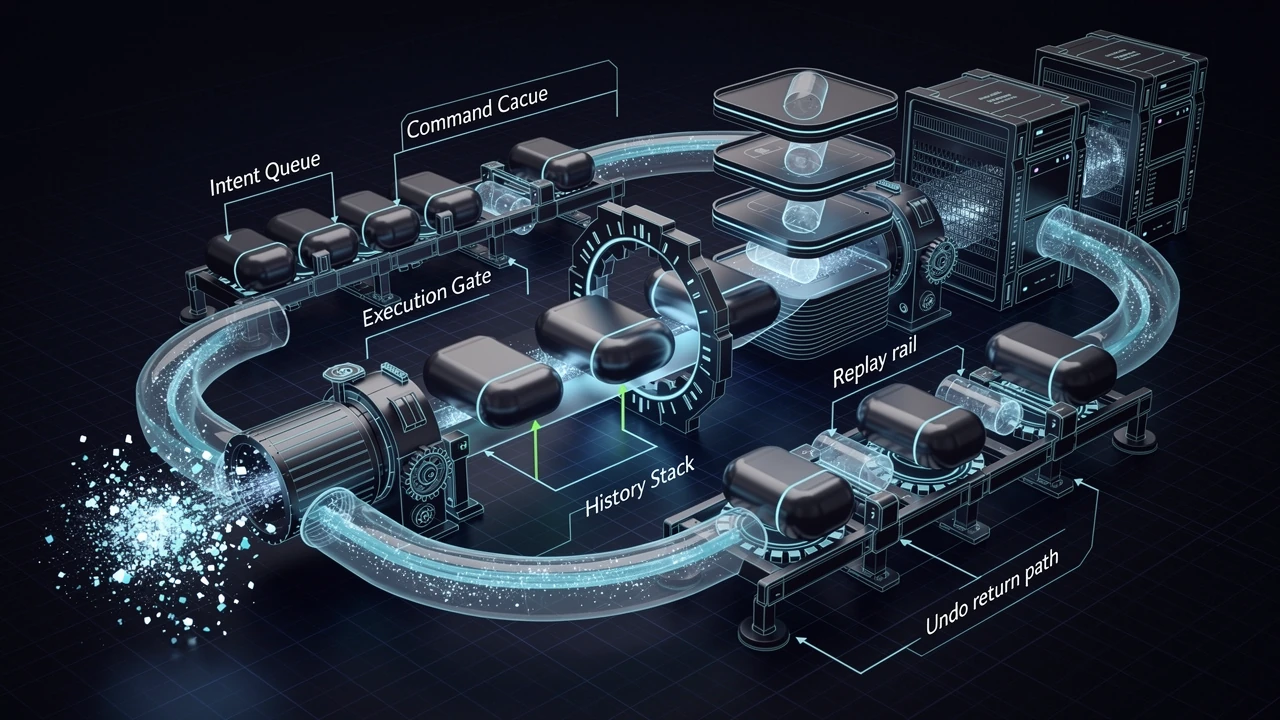
The command pattern shows up in game code when an action needs to travel before it happens.
A button press, a menu click, a network packet, or an AI order often starts as the same thing: a request for an action. The request does not always belong next to the code that performs the action. Sometimes the request needs to wait until the right frame. Sometimes it needs to be recorded for replay. Sometimes it needs to be undone. Sometimes it needs to cross a system boundary without dragging the whole gameplay layer along with it.
That is the useful shape of the command pattern. It turns intent into an object so the intent can move around as data instead of being trapped inside a direct method call.
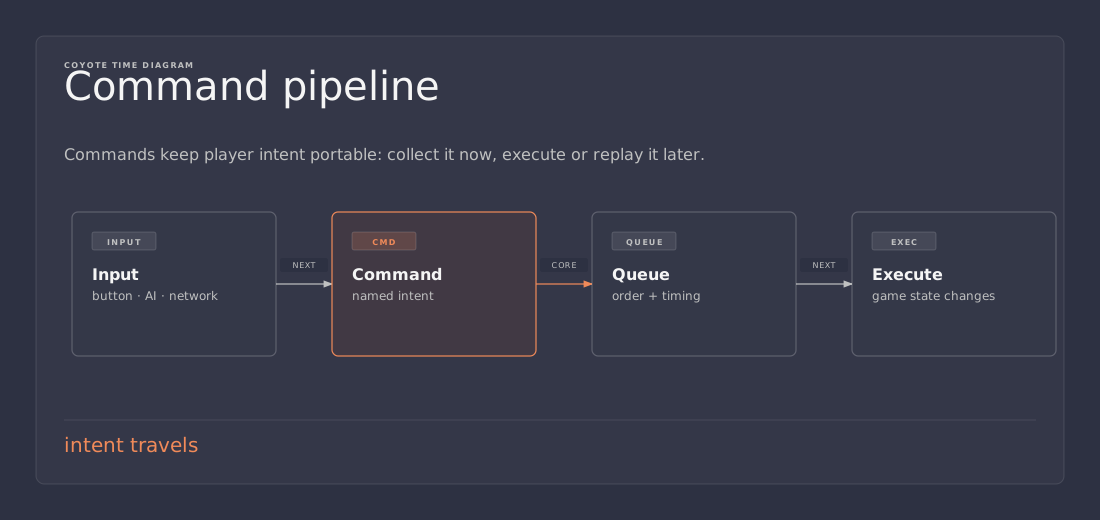
What the pattern actually is
At its core, the command pattern is a request wrapped in an object.
That object usually carries three parts:
- the action to perform
- the data needed to perform it
- the receiver that owns the real work
That sounds formal, but the idea stays simple in practice. Instead of calling character.Jump() from every input path, a project can create a JumpCommand and pass that command to a buffer, queue, recorder, or input handler. The command becomes the unit that moves through the system.
That extra layer is not free, so the pattern only earns its keep when the request needs more than immediate execution. Games run into that situation constantly.
Why games reach for commands so often
Games are full of actions that are easy to describe and awkward to place.
A player presses a button. A UI menu submits an order. A bot decides to attack. A replay file needs to reconstruct a session. A networked simulation wants a small deterministic message instead of a loose pile of state changes. These problems are all different on the surface, but they share one trait: the action should survive outside the place where it was first noticed.
The command pattern helps because it separates request from execution.
That separation buys a few practical benefits:
- Rebindable input — many inputs can map to the same command.
- Input buffering — commands can wait until the right frame or turn.
- Undo and redo — commands can store enough information to reverse themselves.
- Replay — a stream of commands is often easier to store than raw device state.
- Networking — commands can act as compact messages between clients and simulation.
- AI orders — the same action shape can work for player input, scripted behavior, or bot decisions.
That list is the real reason the pattern appears in game architecture books and engine samples. It is not about ceremony. It is about keeping intent portable.
A small C# version
The classic version is tiny.
public interface ICommand
{
    void Execute();
}

public sealed class JumpCommand : ICommand
{
    private readonly ICharacter character;

    public JumpCommand(ICharacter character)
    {
        this.character = character;
    }

    public void Execute()
    {
        character.Jump();
    }
}
That example is almost comically small, which is a good sign. A command should not feel like a mini-framework. It should feel like a small object that says, “perform this action later.”
A buffer that runs commands can stay just as small:
public sealed class CommandBuffer
{
    private readonly Queue<ICommand> pending = new();

    public void Enqueue(ICommand command)
    {
        pending.Enqueue(command);
    }

    public void RunAll()
    {
        while (pending.Count > 0)
        {
            pending.Dequeue().Execute();
        }
    }
}
That version is deliberately boring. Boring code is useful when the goal is to make intent visible without pulling in more machinery than necessary.
Input is the obvious place to start
The easiest way to understand the pattern is through input.
A game usually has at least three layers around input:
- the device or UI event that noticed something happened
- the mapping layer that translates that event into game intent
- the gameplay layer that performs the actual action
Directly wiring button callbacks into gameplay code can work for a prototype, but it gets brittle quickly. The button knows too much. The gameplay code ends up scattered across input paths. Rebinding becomes annoying. Automated testing gets harder. And once a second source of input appears, the wiring starts to multiply.
A command object gives the mapping layer something stable to emit. The button does not need to know how a jump works. It only needs to produce a jump command.
Unity’s Input System already nudges projects in that direction. An action can be performed, rebound, and routed without tying the control directly to a specific gameplay method. That makes it a comfortable home for commands or command-like adapters.
The useful mental model is simple: the input layer decides what was meant; the command says what should happen; the receiver owns how it happens.
Command objects make boundaries cleaner
The best use of the command pattern is usually at a boundary.
That boundary might be:
- input code handing intent to gameplay code
- UI code triggering game systems
- editor tools changing state in a way that can be undone
- replay systems recording player actions
- network code turning messages into deterministic simulation steps
Each of those cases shares the same pressure: one side should not know too much about the other side’s internals.
A direct method call often crosses that boundary too eagerly. It works, but it encourages the caller to reach into the receiver’s details. Over time, the codebase starts to feel local while behaving globally. A click in one place touches state in five others. A small change becomes a cascade.
A command object narrows that seam. The caller produces an intent. The receiver performs the work. The command sits in the middle and keeps the contract small.
That extra object is useful because it reduces how many systems have to know each other’s exact shape.
Undo and redo need commands for a reason
Undo is where the command pattern stops being a neat input trick and starts looking like a real architecture tool.
A direct method call is easy to make, but a reverse operation is not always obvious. If a move command changes position, undo needs the previous position. If a purchase command spends currency, undo needs the amount and the prior balance. If an inventory command moves items, undo needs the source, destination, and item counts.
Commands are a good place to store that reversal data.
A command can record what it needs before it executes. That gives undo a clear path back to the previous state. Redo then becomes another execution of the same intent, often with the same captured data.
That does not mean every game needs a full command history. It only means the pattern is a natural fit when reversibility matters. An editor, strategy game, city builder, or turn-based game often benefits from this immediately. A twitch shooter usually cares less.
Replay and networking benefit from the same idea
Replay systems and networked games often want a stream of actions instead of a stream of state snapshots.
A command stream is compact, readable, and easier to reason about than a full dump of every system at every frame. The game can record “move left,” “fire,” “open door,” or “end turn” rather than trying to serialize the entire world after every update.
That approach has two advantages:
- the log is often much smaller than full state capture
- the sequence of actions can be re-simulated deterministically if the simulation is stable enough
That second part is the important one. Command-driven replay is only as good as the underlying simulation. If random numbers, floating-point drift, or hidden side effects are uncontrolled, the replay will diverge. The command stream is not magic; it just gives the game a cleaner set of inputs to reproduce.
For networking, the same logic applies. A command can stand in for the user’s intention, while the simulation on each machine applies those commands in the agreed order. The smaller and more deterministic the command, the easier the system is to keep honest.
A practical example with player input
Suppose a character can jump, dash, and attack. The game needs the same actions to be reachable from keyboard input, gamepad input, and maybe AI control later.
A simple setup might look like this:
public interface ICharacter
{
    void Jump();
    void Dash();
    void Attack();
}

public interface ICommand
{
    void Execute();
}

public sealed class DashCommand : ICommand
{
    private readonly ICharacter character;

    public DashCommand(ICharacter character)
    {
        this.character = character;
    }

    public void Execute()
    {
        character.Dash();
    }
}

public sealed class AttackCommand : ICommand
{
    private readonly ICharacter character;

    public AttackCommand(ICharacter character)
    {
        this.character = character;
    }

    public void Execute()
    {
        character.Attack();
    }
}
Then the input adapter can map controls to command instances:
public sealed class PlayerInputAdapter
{
    private readonly CommandBuffer buffer;
    private readonly ICharacter character;

    public PlayerInputAdapter(CommandBuffer buffer, ICharacter character)
    {
        this.buffer = buffer;
        this.character = character;
    }

    public void OnJumpPressed()
    {
        buffer.Enqueue(new JumpCommand(character));
    }

    public void OnDashPressed()
    {
        buffer.Enqueue(new DashCommand(character));
    }

    public void OnAttackPressed()
    {
        buffer.Enqueue(new AttackCommand(character));
    }
}
That arrangement keeps the input code narrow. The adapter translates controls into commands. The game loop decides when to run them. The character object still owns the actual behavior.
There is a hidden benefit here: the same command types can be created by a bot, a script, or a network message without inventing a second action system.
Queueing is useful, but not every queue needs a framework
A lot of command-pattern examples drift into overengineering the moment a queue appears.
A simple FIFO queue is often enough. Player input usually does not need a priority heap, a dependency graph, or a tiny scheduling language. If a command arrives too early, it can wait one frame. If it needs to be deferred longer, a timestamp can handle that. If the game eventually needs different lanes for combat, UI, and simulation, those lanes can be added when the problem proves they are necessary.
That is the lazy-but-correct way to treat the pattern: keep the command shape small until the need becomes real.
A command is not automatically better because it is wrapped in an object. It is better when the wrapper solves a specific boundary problem.
When a direct call is still the better choice
The command pattern is useful, but it is not a replacement for normal method calls.
If an action is immediate, local, and never needs to be queued, replayed, undone, or routed through another layer, a plain method call is usually cleaner. That path is easier to read, easier to test, and easier to change later.
That matters because command objects can become noise when used everywhere. A project does not need a command for every helper method, every animation trigger, or every internal system transition. At that point the design stops clarifying the code and starts hiding it.
A good rule is simple:
- use a direct call when the request and the execution belong together
- use a command when the request has to survive beyond the current call site
That distinction keeps the pattern useful instead of theatrical.
Commands versus events
Commands and events look similar at a glance because both can travel through a system, but they serve different purposes.
A command says, “do this.”
An event says, “this already happened.”
That distinction shapes how each one should be used.
A jump command is an instruction. A landed event is a fact. A purchase command requests a change. A gold-collected event reports a completed change. Mixing the two tends to blur ownership and make systems feel less predictable.
The simplest way to keep the design sane is to let commands flow toward action and events flow toward observation.
That separation pays off when the codebase grows. The input layer can emit commands without pretending something has already happened. The simulation can raise events after state changes without pretending the caller still controls the result.
Common variants worth knowing
Several variations show up often enough to be worth naming.
Command with parameters
Some commands carry small argument sets instead of a full receiver reference. A move command might hold a direction vector and speed multiplier. A build command might hold a location, a building type, and a cost.
That works well when the command is also useful as a data packet.
Composite commands
Sometimes a single player action expands into several smaller actions. A skill cast might spend mana, spawn a projectile, and start a cooldown. A composite command can group those together so the higher-level action still reads as one intent.
That said, composite commands should stay honest. If the bundle starts behaving like a whole subsystem, the design probably needs another boundary.
Reversible commands
Undoable systems often add Undo() alongside Execute(). That is useful when the command owns enough information to put the world back the way it was.
The important part is not the interface itself. The important part is whether the command can genuinely restore the previous state without guessing.
Serialized commands
For replay or networking, the command may need to survive disk or the wire. In that case, it should stay small, explicit, and easy to version. The more it resembles a random object graph, the harder the format becomes to evolve.
A few traps to avoid
The command pattern is easy to misuse because it feels tidy at first.
Trap 1: wrapping everything
If every method call turns into a command, the codebase gains ceremony without gaining clarity. The simplest possible action should stay simple.
Trap 2: letting commands grow into mini systems
A command should remain a request. If it starts managing UI, animation, inventory, physics, and quest state all at once, the abstraction has failed.
Trap 3: building a queue before there is a queue problem
A command buffer is helpful when actions need timing or ordering. It is unnecessary when the action should happen now.
Trap 4: confusing commands with events
A request is not a fact. A fact is not a request. When those roles blur, the code becomes harder to debug.
Trap 5: assuming command streams guarantee determinism
Replay and networking need deterministic simulation as much as they need a command log. The command pattern helps with the input side, not the whole problem.
A short implementation checklist
When a command pattern feels appropriate, the design usually stays healthier if the following questions are answered early:
- What boundary is the command crossing?
- What needs to be stored with the intent?
- Does the action need to be undoable?
- Does it need to be queued, replayed, or serialized?
- Can the command stay tiny, or is a direct call enough?
Those questions are more useful than starting with a class diagram. They keep the pattern tied to the actual problem rather than to the idea of a pattern.
The practical takeaway
The command pattern is a good fit when intent needs to outlive the moment it was created.
In game code, that usually means input mapping, buffering, undo, replay, networking, or clean separation between systems. A command object gives those problems a stable shape. It turns “something should happen” into a small unit that can move, wait, repeat, or be reversed.
That is the part that makes the pattern valuable. It protects the game from tangled direct calls when the request has to travel.
It is also the part that keeps the pattern honest. When the request does not need to travel, a direct method call is still the better tool. Good architecture in games is often less about using the fanciest abstraction and more about choosing the smallest one that still survives the real constraints.
References
- Robert Nystrom, Command
- Unity Manual, Input actions
- Refactoring Guru, Command