13 minutes
Memento Pattern in Games: Save the State Without Exposing the Guts

The memento pattern is useful when a system needs to go back to a previous state, but nobody outside that system should be allowed to rummage through its internals.
That sounds like a save system, and it can be. It also sounds like undo in an editor tool, rollback for a turn-based tactics prototype, checkpoints in a puzzle game, temporary simulation branches for AI planning, or a “try this change and cancel if it fails” workflow in gameplay code. All of those problems have the same shape: capture enough state to restore later, keep the capture owned by the object that understands it, and avoid turning private fields into public plumbing.
The pattern is not glamorous. That is why I like it. Good mementos are boring containers at the edge of a system. They make restoration explicit without pretending that every object in the game can serialize itself safely just because the compiler allowed it.
The small version
The memento pattern has three roles.
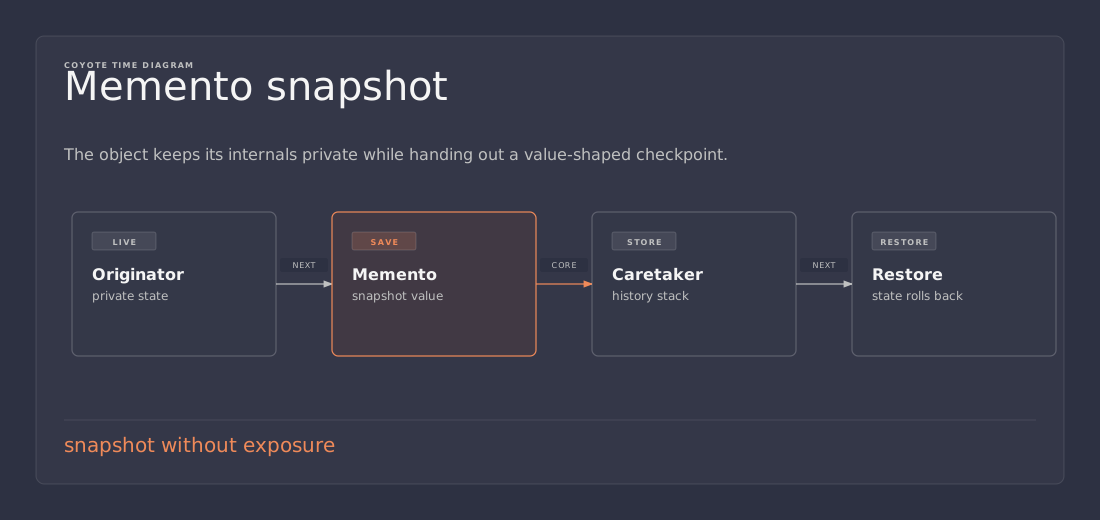
The originator is the object whose state can be captured and restored. The memento is the snapshot. The caretaker stores the snapshot and gives it back later, but does not understand or modify what is inside it.
In game terms, the originator might be a puzzle board, an inventory model, a unit stat block, a dialogue graph editor, or a combat command queue. The caretaker might be an undo stack, save slot manager, checkpoint trigger, or test harness. The important rule is that the caretaker does not get to manipulate the originator’s private details directly.
A small C# shape looks like this:
public sealed class Inventory
{
    private readonly List<ItemStack> items = new();

    public InventorySnapshot CreateSnapshot()
    {
        return new InventorySnapshot(items.Select(x => x.Clone()).ToArray());
    }

    public void Restore(InventorySnapshot snapshot)
    {
        items.Clear();
        items.AddRange(snapshot.Items.Select(x => x.Clone()));
    }
}

public sealed record InventorySnapshot(ItemStack[] Items);
That is the pattern. Capture. Store. Restore.
The code only becomes difficult when the object graph is bigger than the example, which of course is where game code lives most of the time.
Why not just expose the fields?
The lazy answer is tempting: make a few properties public, let the save manager read them, and move on.
That can work for a throwaway prototype. It becomes expensive when those fields stop being a clean representation of the gameplay state. A health component might cache derived values. An inventory might index items by slot and by item id. A quest system might store runtime-only listeners next to persistent quest progress. A board game model might keep temporary highlights, animation hints, and deterministic state in the same object.
If the save manager knows all of that, the ownership is backwards. The save manager becomes the real expert on every subsystem, and every gameplay refactor now risks breaking save, undo, replay, and tests at the same time.
A memento keeps the decision near the code that owns the invariants. The inventory decides what an inventory snapshot means. The quest log decides which fields are durable progress and which fields are presentation noise. The puzzle board decides whether current animations matter when restoring a move.
That does not remove the work. It puts the work in the place least likely to lie.
Memento is not the same as “serialize everything”
Unity makes this distinction easy to blur because serialization is everywhere. Scenes serialize components. Prefabs serialize fields. ScriptableObjects serialize content. JSON tools serialize DTOs. It is natural to reach for the same word when building save data.
A memento is a snapshot of meaningful state. Serialization is one possible way to store or transport that snapshot.
Those are different decisions.
For an undo stack inside an editor tool, the memento may never leave memory. A compact immutable object is enough. For a checkpoint inside a single level, it might be acceptable to hold a snapshot until the player leaves the scene. For a real save slot, the snapshot needs a stable format, versioning, validation, and failure handling. For netcode rollback, the snapshot probably needs to be small, deterministic, and cheap to copy.
Do not let the storage format choose the game architecture. Start with the restore contract: what state must come back, at what point in the frame, under which version of the code, and with which external dependencies available?
Only after that should you decide whether the memento becomes JSON, binary, a ScriptableObject clone, a custom byte buffer, or a plain in-memory record.
The first trap: shallow snapshots
The most common memento bug is accidentally keeping references to mutable objects.
public InventorySnapshot CreateSnapshot()
{
    return new InventorySnapshot(items); // Bug: same list, same item objects.
}
This looks like a snapshot, but it is just a second handle to live state. If the inventory changes, the “snapshot” changes with it. Restore might appear to work in simple tests because the list still has familiar values, then fail when an item stack mutates in place.
For mutable state, a snapshot needs its own copy of the data it promises to preserve.
That does not always mean a deep copy of the entire world. It means copying the state at the boundary you are restoring. If an inventory snapshot stores item ids and counts, copy those values. If an item instance has durability, affixes, and generated identity, copy those values too. If item definitions live in immutable data assets, store an id or reference to the definition instead of cloning the definition itself.
The useful question is: after capture, can normal gameplay mutate something that the snapshot depends on?
If yes, the snapshot is not isolated enough.
The second trap: saving runtime objects instead of state
A memento should rarely store live engine objects as the main truth.
In Unity, a GameObject, Transform, MonoBehaviour, asset reference, or event subscription is usually not the state you want to save. It is runtime machinery around the state. Sometimes a reference is fine as a lookup key inside one scene. For long-lived saves and robust undo, prefer data that can be validated and reconstructed.
For example, this is fragile save data:
public sealed record DoorSnapshot(GameObject DoorObject, bool IsOpen);
This is usually better:
public sealed record DoorSnapshot(string DoorId, bool IsOpen, float OpenAmount);
The second version gives the restore code room to say useful things. If DoorId is missing, the save can report a broken reference. If the door prefab changed, the restore path can map old ids to new ids. If the game loads additively, the save system can wait until the relevant scene is present before applying the snapshot.
Live references are convenient until the object is destroyed, renamed, pooled, unloaded, replaced by a prefab variant, or moved to another scene. State survives those changes better than objects do.
Undo stacks want different mementos than save files
Undo and save are often taught together, but they have different pressures.
An undo stack usually lives for minutes. It can store richer data because it only needs to survive the current session. It may also care about editor-facing details that a save file should ignore: current selection, temporary tool mode, or a user’s unsaved graph layout.
A save file may need to survive months, patches, platform differences, partial corruption, and player support tickets. It should be boring, versioned, and independent from incidental runtime details. It should use stable identifiers. It should validate input before mutating the live game.
Because of that, I usually avoid one universal snapshot type for every purpose. The board editor can have a BoardUndoSnapshot. The save system can have a BoardSaveData. They may share conversion helpers internally, but they do not need to pretend the same shape serves both jobs.
This is one of those places where duplication can be cheaper than false reuse. Two small DTOs with clear jobs beat one “global snapshot” type full of fields that only some callers understand.
Keep restoration boring and atomic
Restoring state is where damage happens.
Capture bugs are annoying. Restore bugs can corrupt the live model. A good restore path should be boring, explicit, and hard to half-apply.
For small objects, clearing and rebuilding can be safer than trying to patch the existing state in place:
public void Restore(BoardSnapshot snapshot)
{
    cells.Clear();

    foreach (var cell in snapshot.Cells)
    {
        cells[cell.Position] = new BoardCell(cell.TileId, cell.ActorId);
    }

    RebuildLookupTables();
    RaiseBoardChanged();
}
The important part is not the exact code. The important part is the sequence:
- discard or isolate the old mutable state
- apply the snapshot data
- rebuild derived caches
- notify the rest of the game once
That last step matters. If every restored cell fires an event, subscribers may see a half-restored board. UI can flicker. AI can react to invalid intermediate state. Network code can replicate nonsense.
When restore is a batch operation, treat it as a batch operation. Suppress per-field notifications if needed, rebuild the model, then publish one clear change event.
Validate before you mutate
Save files and remote snapshots are trust boundaries. Undo snapshots made inside the same process are usually safer, but even those can become stale after a tool changes.
Before applying a memento, check the cheap invariants:
- is the snapshot version supported?
- are required ids present?
- are counts inside allowed limits?
- do referenced definitions exist?
- are enum values known?
- are positions inside the board or level bounds?
- can this snapshot be applied in the current game mode?
Do those checks before touching live state. If validation fails halfway through restore, the player should not end up with a partly loaded inventory and a broken quest log.
For larger saves, I like a two-step flow: parse into raw save data, validate and resolve ids into a restore plan, then apply the plan. The restore plan is allowed to contain resolved references because it is short-lived and already checked. The durable memento stays simple and portable.
That sounds heavier than the toy pattern, but it is still the same idea. The caretaker holds data. The originator controls how that data becomes valid state again.
Versioning is part of the pattern in shipped games
A memento example in a design-pattern article does not usually talk about versioning. A shipped game has to.
The moment a snapshot leaves memory and lands on disk, it becomes a contract with future builds. Fields will be renamed. Items will be removed. Quest logic will change. Balance data will move from one table to another. If the save format has no version, the restore code has to guess which world it is reading.
Put a version on durable snapshots early.
public sealed record SaveGameV3(
    int Version,
    string PlayerId,
    InventorySaveData Inventory,
    QuestSaveData Quests,
    WorldSaveData World);
The version does not need to be fancy. It just needs to let the loader choose a migration path. A common setup is:
SaveGameV3 save = raw.Version switch
{
    1 => MigrateV1ToV3(raw),
    2 => MigrateV2ToV3(raw),
    3 => ParseV3(raw),
    _ => throw new UnsupportedSaveVersionException(raw.Version)
};
For some games, old saves can be abandoned. For others, compatibility is a serious player trust issue. Either way, make the decision explicit. Silent guessing is how small save changes become unreproducible bug reports.
Where mementos fit with commands
The command pattern and memento pattern pair naturally, especially for undo.
A command says what to do. A memento remembers what the world looked like before the command did it.
public sealed class MoveUnitCommand
{
    private BoardSnapshot? before;

    public void Execute(Board board, UnitId unit, CellPosition target)
    {
        before = board.CreateSnapshot();
        board.MoveUnit(unit, target);
    }

    public void Undo(Board board)
    {
        if (before is null) return;
        board.Restore(before);
    }
}
This is deliberately simple. In a serious tactics game, snapshotting the entire board for every move may be too expensive. The upgrade path is to store a smaller delta: unit id, old position, new position, previous action points, captured unit state, and any changed tile effects.
But start with the whole-board snapshot if it is cheap enough. It is easier to test, easier to reason about, and less likely to miss a side effect. Optimize when measurements show that the snapshot cost matters.
That is the practical version of laziness: begin with the lowest-risk correct model, not the cleverest one.
Whole snapshots versus deltas
A memento can store a full snapshot or a delta.
A full snapshot captures everything needed to restore the target object. It is straightforward and robust. It can be expensive if the state is large or captured often.
A delta snapshot captures only what changed. It is smaller and often faster, but it requires more careful restore logic. If the command changes five systems and the delta records four of them, undo becomes a source of ghosts.
For game code, my default split is:
- use full snapshots for small models, prototypes, tools, and low-frequency checkpoints
- use deltas for high-frequency undo, rollback, or large worlds
- use explicit save DTOs for durable player saves
- avoid raw object graphs unless the lifetime is tightly controlled
Measure before making this complicated. A 20 KB board snapshot taken once per player move is probably fine. A 20 KB snapshot taken sixty times per second for rollback is not.
A workable Unity boundary
In Unity projects, I prefer to keep snapshot logic out of random MonoBehaviour components where possible.
A MonoBehaviour is a good adapter to the scene. It is not always a good owner of durable state. The cleaner shape is often a plain C# model with memento methods, plus a Unity-facing component that visualizes or synchronizes that model.
public sealed class PuzzleBoardModel
{
    private readonly Dictionary<Vector2Int, TileState> tiles = new();

    public PuzzleBoardSnapshot CreateSnapshot() =>
        new(tiles.Select(pair => TileSnapshot.From(pair.Key, pair.Value)).ToArray());

    public void Restore(PuzzleBoardSnapshot snapshot)
    {
        tiles.Clear();
        foreach (var tile in snapshot.Tiles)
            tiles[tile.Position] = tile.ToState();
    }
}

public sealed class PuzzleBoardView : MonoBehaviour
{
    [SerializeField] private TileView tilePrefab;

    public void Render(PuzzleBoardModel model)
    {
        // Update pooled views from model state.
    }
}
That boundary pays off in tests. The model can be tested without a scene. Snapshots can be compared as plain data. Restore can run in edit-mode tests or a console runner. The Unity layer still matters, but it no longer owns every decision about persistence.
Some projects cannot draw that line cleanly, especially late in production. Fine. Put the memento methods where the state actually lives. Just do not make the save manager crawl through every component with reflection and hope that the result is a valid game.
A small checklist before using memento
The pattern is worth reaching for when at least one of these is true:
- callers need undo, redo, checkpoints, rollback, or speculative changes
- the object has private state that should not be exposed just for saving
- restore must rebuild invariants or derived caches
- snapshots need to be stored by a manager that should not understand internals
- the save format should stay stable while implementation details change
It is probably overkill when:
- the object is already a tiny immutable value
- a direct copy constructor is enough
- the state is never restored
- exposing data is already the point of the type
- the snapshot would be larger and more complex than the object itself
Patterns are tools, not achievements. The memento pattern earns its keep when it protects ownership. If it only adds ceremony around simple data, skip it.
Practical takeaway
Use mementos to draw a clean line between “someone needs to hold this previous state” and “someone gets to understand this object’s internals.”
For in-memory undo, start with full snapshots unless they are clearly too expensive. For durable saves, make snapshots explicit data contracts with stable ids, validation, and versioning. For Unity projects, keep the durable state as plain data when you can, and let scene objects rebuild from it instead of becoming the save format themselves.
The point is not to worship the pattern name. The point is to make restore boring, local, and safe. Future-you will appreciate that more than a clever save manager that knows too much.
References
- Refactoring.Guru, “Memento” — overview of the originator, memento, and caretaker roles.
- Unity Manual, “Script serialization” — useful context for what Unity serializes and why engine serialization is not the same as a save-game contract.
- Microsoft Learn, “System.Text.Json overview” — practical reference for JSON serialization when a snapshot needs to become durable data.
- Robert Nystrom, Game Programming Patterns, “Command” — helpful companion pattern for undo and action history.