6 minutes
Using the Observer Pattern in Games
One of the most common problems you run into in game development is figuring out how two unrelated objects should communicate without making the code brittle.
Maybe an enemy dies and the score should update. Maybe the player enters an arena and the gate should lock. Maybe the UI should light up when a boss starts. If you wire those systems together with direct calls everywhere, the code gets tangled very quickly.
That is exactly the kind of situation where the observer pattern helps.
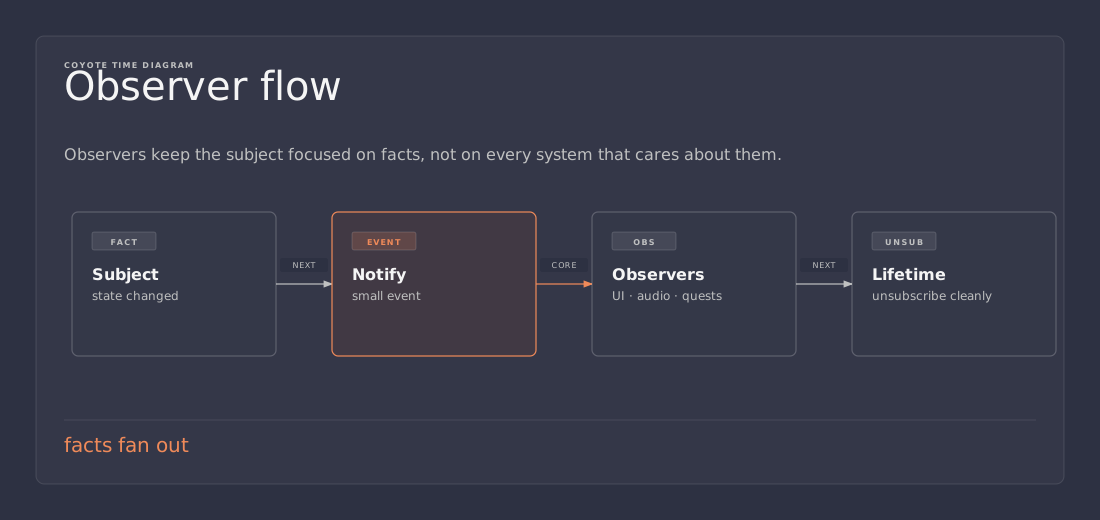
The core idea
Observer works well as a subscription list.
One object produces an event. One or more other objects care about that event. The producer should not need to know who is listening.
That sounds small, but it changes the shape of the code.
Instead of asking, “How do I reach into the UI from gameplay code?”, you ask, “What happened?” and let the interested systems react.
That gives you a much cleaner boundary.
What the pattern looks like
At the core, observer is just a subject that keeps track of listeners and notifies them when something interesting happens.
In C#, that often looks like this:
public sealed class PlayerEnteredArenaSignal
{
    public event Action? Raised;

    public void Fire()
    {
        Raised?.Invoke();
    }
}
And then another system subscribes:
public sealed class ArenaGate : MonoBehaviour
{
    [SerializeField] private PlayerEnteredArenaSignal signal = null!;

    private void OnEnable()
    {
        signal.Raised += LockGate;
    }

    private void OnDisable()
    {
        signal.Raised -= LockGate;
    }

    private void LockGate()
    {
        // Close the gate, play animation, maybe trigger a sound.
    }
}
The gate does not need to know who detected the player. The detector does not need to know how the gate works. That is the whole point.
Why this beats direct references everywhere
Direct references are fine when objects are tightly related and live near each other. If a door and a trigger volume are part of the same arena setup, passing a reference can be the simplest thing that works.
The trouble starts when that same style spreads through the whole project.
Then you end up with:
- gameplay code calling UI code directly
- UI code reaching back into gameplay state
- audio code depending on scene-specific objects
- one object knowing too much about the rest of the level
That is how “just one more reference” turns into scene spaghetti.
Observer helps because it turns communication into a contract:
When this happens, whoever cares may react.
That keeps the producer focused on its own job. It also makes the consumers easier to replace.
Nearby communication vs distant communication
Not every connection should be solved the same way.
If two objects are close in the hierarchy, a direct reference is often enough. If they are far apart, something looser usually fits better.
A rough layout might look like this:
Game
├─ Level
│  ├─ Arena
│  │  ├─ EntranceDetector
│  │  └─ Gate
└─ UI
   └─ BossHUD
The gate and the detector can probably talk through a local reference. The boss HUD should not know anything about the arena layout.
That is where a broader event system or event bus makes sense.
Observer vs event bus
People often blur these together, but they are not the same thing.
- Observer: one subject, many listeners
- Event bus: a shared place where unrelated systems publish and subscribe to named events
Observer is great when the relationship is local and obvious. An event bus is useful when the sender and receiver live far apart.
Splitting buses by concern is better than making one giant global dumping ground.
A single GlobalEventBus becomes a junk drawer quickly.
An AudioEvents, UIEvents, or GameplayEvents bus is at least honest about scope.
The Unity version of this pattern
In Unity, this pattern usually shows up in one of three forms:
- C# events / delegates
- UnityEvents
- ScriptableObject event channels or custom event services
For most gameplay code, plain C# events are still the least surprising option. They are simple, fast enough for normal gameplay code, and easy to read.
The important part is not the exact API. It is the rule behind it:
- subscribe when the object becomes active
- unsubscribe when it goes away
- do not keep phantom listeners around
That last part matters more than people think. A forgotten subscription is how you get ghost callbacks and objects reacting long after they should be dead.
A practical example: arena gate and boss UI
Suppose your level has three pieces:
- a trigger that notices the player entered the arena
- a gate that should lock
- a boss UI that should appear
The trigger raises one event. The gate listens. The UI listens.
None of them needs to call the others directly.
That buys you a few things:
- the trigger can be reused in another level
- the gate can be reused for another encounter
- the UI can be swapped without rewriting the arena logic
That is the sort of reuse that matters in game production. Not theoretical reuse. Practical reuse.
Common mistakes
1. Using observer everywhere
If everything is an event, nothing is clear.
A direct reference is still the best solution for many local relationships. Use observer when the coupling actually hurts you.
2. Forgetting to unsubscribe
This is the classic Unity mistake.
If an object subscribes in OnEnable, it should usually unsubscribe in OnDisable.
3. Turning events into hidden state machines
If a system only makes sense after you read six event handlers and a bus implementation, the design is probably too clever.
4. Making the event payload too vague
“Something happened” is not enough for long. Give the listener enough context to do its job. If a boss died, the listener may need the boss ID, the killer, or the arena stage.
5. Building one universal bus
A single global bus feels convenient until it becomes impossible to reason about. Smaller, domain-specific buses are usually easier to maintain.
What to remember
The observer pattern is not magic. It is just a clean way to say:
- one thing changed
- some other things may care
- let them react without hard-wiring them together
That makes it a strong fit for UI updates, achievement tracking, enemy deaths, quest progression, arena logic, and a lot of other game systems that want to stay loosely coupled.
The real lesson is not just “use events.” It is “be intentional about communication paths.”
Direct references are fine when the relationship is local. Observer is better when the relationship should stay loose. Event buses are useful when the objects are too far apart to know about each other directly.
Use the smallest tool that keeps the code honest.
References / Further reading
- Microsoft Learn: Observer design pattern https://learn.microsoft.com/en-us/dotnet/standard/events/observer-design-pattern
- Game Programming Patterns: Observer https://gameprogrammingpatterns.com/observer.html
- Unity documentation: UnityEvents https://docs.unity3d.com/Manual/UnityEvents.html