8 minutes
Dependency Injection in Unity: Stop Letting Objects Hunt for Their Own Tools

A lot of Unity code starts the same way: a MonoBehaviour reaches into a singleton, grabs another component from the scene, pulls a manager out of static state, and then quietly grows into a knot nobody wants to touch.
It works. Right up until it doesn’t.
The problem is not that Unity is bad at dependency management. The problem is that most game code never decides who is responsible for wiring things together. Dependency injection is the boring answer to that problem, and boring is good here.
What dependency injection actually means
Dependency injection is not “use a framework.”
It is simpler than that:
A class should receive the things it needs from the outside instead of creating them or searching for them itself.
That sounds small, but it changes the shape of the code.
Without DI, a class often knows:
- what it depends on
- how to build those dependencies
- where to find them
- when they should be created
- when they should be destroyed
With DI, the class only knows:
- what it needs
- how to use it
That split matters because it separates configuration from behavior.
Martin Fowler’s classic DI article makes this point clearly: the important part is not the container, but the architectural rule that setup lives in one place and usage lives somewhere else.
Why games benefit from this more than you might think
Game code tends to accumulate “just one more reference” problems.
A gameplay system starts out small:
- health component
- damage source
- UI update
- sound effect
Then it grows:
- analytics
- save data
- difficulty tuning
- tutorials
- network replication
- accessibility feedback
If each system finds its own dependencies, the code becomes a hidden dependency graph. That graph still exists, but now it lives in scattered FindObjectOfType, singletons, static helpers, and scene-specific setup code.
That is where DI helps.
It makes the dependency graph visible.
And once the graph is visible, you can change it without playing archaeology.
The Unity-specific mistake: confusing DI with service location
This is the part people get wrong.
A common anti-pattern looks like DI but isn’t:
public class PlayerHud : MonoBehaviour
{
    void Awake()
    {
        _gameState = ServiceLocator.Resolve<GameState>();
        _audio = ServiceLocator.Resolve<AudioService>();
    }
}
That code is not injection. It is just dependency hiding.
The class still depends on GameState and AudioService, but now the dependencies are implicit. You have made the code harder to read, harder to test, and harder to move.
Real DI makes dependencies obvious at the boundary.
Better:
public sealed class PlayerHudPresenter
{
    private readonly IGameState _gameState;
    private readonly IAudioService _audio;

    public PlayerHudPresenter(IGameState gameState, IAudioService audio)
    {
        _gameState = gameState;
        _audio = audio;
    }
}
Now the constructor says what this object needs. No guessing. No global search. No hidden magic.
What to inject in a game
Not everything needs DI. That would be silly.
Inject:
- services
- repositories
- command handlers
- gameplay rules
- data access
- logging
- save/load services
- network facades
- factories
Do not inject everything just because you can.
Usually you should not inject:
- tiny local values
- one-off temporary data
- raw engine objects just because it feels “clean”
- things the object can already own naturally
A useful rule is this:
Inject stable collaborators. Keep local state local.
That keeps the constructor useful instead of turning it into a junk drawer.
A practical Unity pattern: composition root plus pure C# systems
Unity makes people nervous about DI because MonoBehaviour is not a normal class.
That is fair. But it does not block DI. It just means the wiring needs a clear home.
A good pattern is:
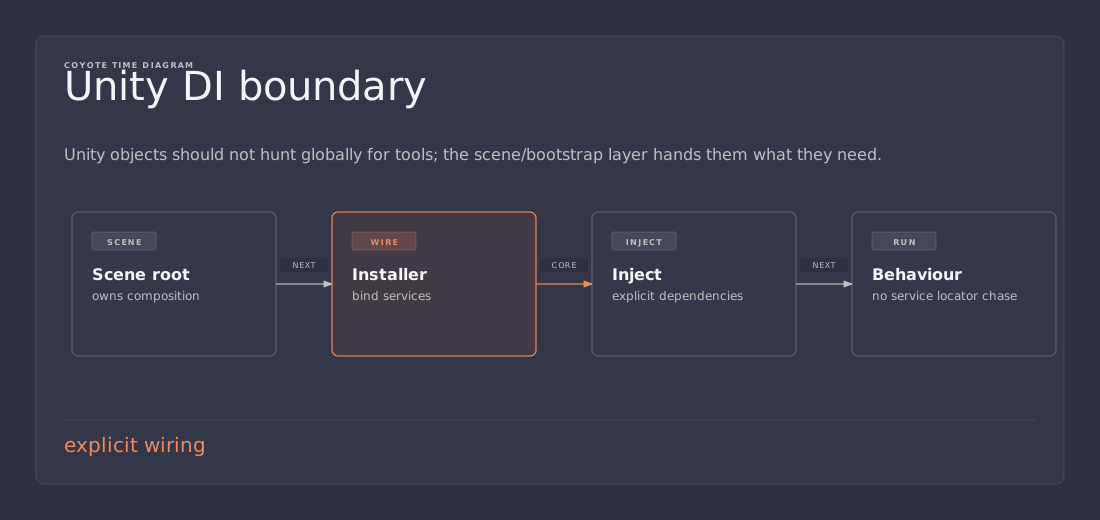
- Use a boot scene or composition root.
- Build the object graph there.
- Pass dependencies into pure C# systems.
- Keep
MonoBehaviouras the boundary layer.
That gives you the best of both worlds:
- Unity handles lifecycle and scene objects
- your gameplay logic stays testable and explicit
Example
Imagine a simple inventory flow.
public interface IInventory
{
    bool HasItem(string id);
    void Add(string id);
}

public interface ISaveService
{
    void SaveInventory(IInventory inventory);
}

public sealed class LootPickupSystem
{
    private readonly IInventory _inventory;
    private readonly ISaveService _saveService;

    public LootPickupSystem(IInventory inventory, ISaveService saveService)
    {
        _inventory = inventory;
        _saveService = saveService;
    }

    public void Pickup(string itemId)
    {
        _inventory.Add(itemId);
        _saveService.SaveInventory(_inventory);
    }
}
This class is easy to test because it does not care about Unity. It cares about behavior.
Then a thin Unity entry point can wire it up:
public class GameBootstrap : MonoBehaviour
{
    [SerializeField] private Inventory inventory;
    [SerializeField] private SaveService saveService;

    private LootPickupSystem _lootPickupSystem;

    private void Awake()
    {
        _lootPickupSystem = new LootPickupSystem(inventory, saveService);
    }
}
That is manual injection. No framework required.
If the project grows, a container can reduce the glue code. But the design idea stays the same.
Manual DI is not a toy
A lot of developers jump straight to a container because they assume DI means a framework.
It doesn’t.
For smaller systems, manual DI is often the cleanest option:
- fewer moving parts
- less magic
- easier debugging
- no container-specific learning curve
If the object graph is tiny, just wire it by hand.
Use a container only when the composition starts getting repetitive or the object graph becomes annoying to maintain manually.
That is the lazy answer, and lazy is good when it means “don’t build machinery you do not need.”
When a DI container makes sense
A container starts earning its keep when you have:
- many services with layered dependencies
- scoped lifetimes
- runtime-created gameplay objects
- separate presentation and domain layers
- multiple scene roots
- a need for easier testing and replacement
In Unity, containers like VContainer are attractive because they support:
- constructor injection
- scoped lifetime objects
- pure C# entry points
- runtime child scopes
- cleaner setup for additive scenes or modular systems
That said, a container is still a tool, not an architecture. If the design is bad, the container just helps wire the bad design faster.
The real benefit: better ownership
The hidden win of DI is not testability, although that is nice.
The real win is ownership clarity.
Ask these questions:
- Who creates this object?
- Who configures it?
- Who owns its lifetime?
- Who can replace it?
- Who is responsible for cleanup?
DI forces those questions into the open.
That matters in games because game code often has messy lifetime boundaries:
- scene load
- additive scene unload
- menu vs gameplay
- editor-only tools
- runtime-generated entities
- save/load transitions
- network reconnects
If you do not know where dependencies come from, cleanup becomes guesswork.
And guesswork becomes bugs.
Common mistakes
1. Injecting everything
If every parameter is a dependency, the class is probably doing too much.
2. Using DI to hide bad architecture
A container will not save a system that mixes UI, gameplay rules, persistence, and network sync in one class.
3. Replacing one global with another
A service locator is just a global with a nicer outfit.
4. Making constructors unreadable
If construction becomes a parade of unrelated services, split the class.
5. Treating Unity objects like ordinary objects
MonoBehaviour and ScriptableObject have engine lifecycles. Respect them instead of pretending they are plain C# instances.
A useful mental model for Unity projects
Think of your game in layers:
- Presentation layer: MonoBehaviours, UI views, animation glue, scene objects
- Gameplay logic: rules, state transitions, commands, state machines
- Data/services: save/load, HTTP, analytics, audio, matchmaking, persistence
Presentation should depend on gameplay logic.
Gameplay logic should depend on interfaces, not scene search.
Data/services should sit at the edges.
Dependency injection is the mechanism that keeps those boundaries honest.
Practical example: UI without scene spaghetti
Suppose you are building a pause menu.
The wrong version:
- button code finds the audio manager
- button code finds the game manager
- button code changes time scale directly
- button code decides how save/load works
- button code knows too much
The better version:
- the view raises a “ResumeClicked” event
- a presenter or controller handles the action
- the controller talks to injected services
- the view stays dumb
That structure is easier to maintain because UI stops being the place where all game rules go to die.
This is one reason DI and modular UI systems go together so well.
When not to use DI
Do not force DI into:
- trivial throwaway tools
- tiny prototypes that will be deleted tomorrow
- local state that is naturally owned by one object
- code where the dependency is obvious and immutable already
If DI makes the code heavier than the problem, skip it.
The goal is not purity. The goal is clarity.
Takeaways
- Dependency injection is about receiving dependencies from outside, not building them inside.
- The big win is separating configuration from use.
- In Unity, a composition root or boot scene keeps the wiring centralized.
- Manual injection is often enough for small systems.
- A container helps when the object graph and lifetimes get more complex.
- Do not confuse DI with service location. Hidden dependencies are still hidden, even if they are behind a fancy API.
If you want cleaner game code, start by asking one question: should this class know how to find what it needs?
Most of the time, the answer is no.
Related reading: Build a Simple DI Container in C# walks through what actually happens inside the container. Combining Reflex DI with Factories shows the same idea applied to runtime factories in Unity.