22 minutes
Build a Simple DI Container in C#: Object Graphs Without the Magic Trick

Dependency injection containers look more mysterious than they are.
That is partly because mature frameworks have a lot of surface area: scopes, decorators, open generics, factories, validation, source generators, keyed services, child containers, disposal rules, Unity scene integration, and enough extension methods to make autocomplete tired. Useful tools, yes. Magic, no.
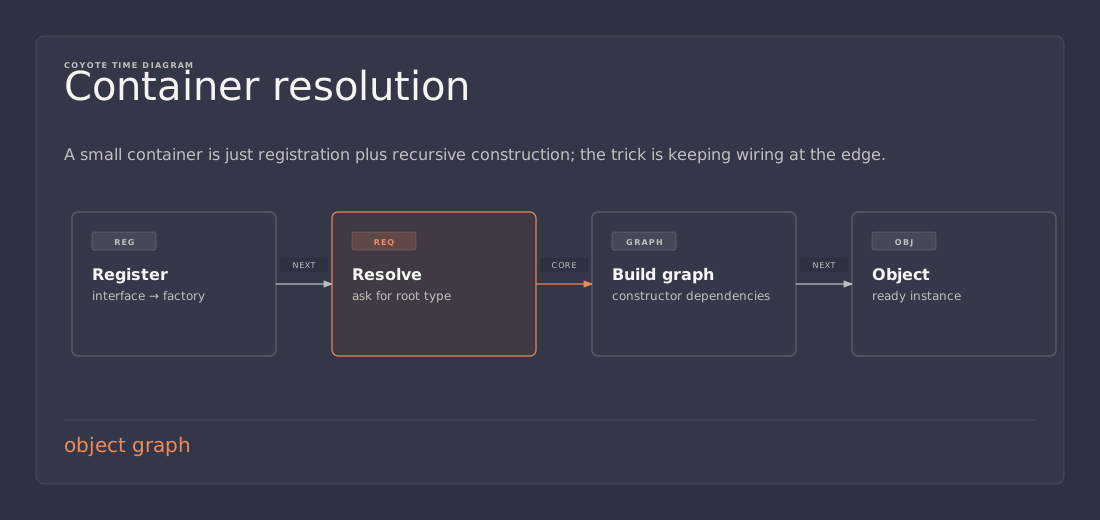
At the core, a DI container is an object-graph builder. It stores instructions that say “when someone asks for this type, build that type.” Then, when asked for an object, it walks the constructor parameters, builds the dependencies first, and finally calls the constructor.
That is the part worth understanding.
This article builds a small DI framework from scratch in C#. Not a production framework. Not a replacement for Microsoft.Extensions.DependencyInjection, Autofac, VContainer, Reflex, or whatever your project already uses. A teaching container. Small enough to read in one sitting, functional enough to explain what actually happens inside the box.
The ordinary problem
A lot of C# code starts like this:
public sealed class Player
{
    private readonly InventoryService inventory = new InventoryService();

    public void Pickup(Item item)
    {
        inventory.Add(item);
    }
}
That looks harmless because it is harmless when the project is tiny. The player needs inventory behavior, so it creates an inventory service.
Then the inventory service grows:
public sealed class InventoryService
{
    private readonly SaveService save = new SaveService();
    private readonly AudioService audio = new AudioService();

    public void Add(Item item)
    {
        // Add the item.
        save.MarkDirty();
        audio.Play("pickup");
    }
}
Now Player is not only coupled to InventoryService. It is indirectly coupled to SaveService and AudioService, because constructing inventory constructs those too. If AudioService later needs configuration, the dependency chain keeps spreading.
Testing also gets annoying. A simple player test now creates real save and audio services unless the code is rewritten. That is how a five-line unit test accidentally starts touching disk, playing sounds, loading assets, or depending on Unity scene state. Congratulations, the test now has side quests.
The first fix is constructor injection:
public sealed class Player
{
    private readonly IInventoryService inventory;

    public Player(IInventoryService inventory)
    {
        this.inventory = inventory;
    }

    public void Pickup(Item item)
    {
        inventory.Add(item);
    }
}
Now Player says what it needs. It does not know how inventory is built. It does not know whether the inventory implementation saves to disk, memory, cloud storage, or a fake test double.
That is dependency injection. A class receives its dependencies from the outside instead of constructing or locating them itself.
But this creates the next question:
var save = new SaveService();
var audio = new AudioService();
var inventory = new InventoryService(save, audio);
var player = new Player(inventory);
Something still needs to create SaveService, create AudioService, create InventoryService, create Player, and connect the graph in the right order.
For a small program, writing those new calls manually is fine. Do not over-engineer breakfast. But when the graph grows, teams often want one place to register construction rules and one resolver that can build the graph on demand.
That is the problem our tiny DI container will solve.
Stage 1: service registration
Start with the smallest useful registration API:
container.Register<IInventoryService, InventoryService>();
Conceptually, the container stores this mapping:
IInventoryService -> InventoryService
When someone asks for IInventoryService, the container should construct InventoryService.
Interfaces are common because they give the caller a narrow contract. Player should not care whether inventory is stored in memory, a save file, or a server-backed profile. It only needs IInventoryService.
But interfaces should not be required for everything. Sometimes a concrete class is already the right contract:
container.Register<GameManager, GameManager>();
That looks silly enough that we can support a shorter version later:
container.Register<GameManager>();
Internally, we need a dictionary keyed by the requested type.
public sealed class Container
{
    private readonly Dictionary<Type, ServiceDescriptor> services = new();
}

public sealed class ServiceDescriptor
{
    public ServiceDescriptor(Type serviceType, Type implementationType)
    {
        ServiceType = serviceType;
        ImplementationType = implementationType;
    }

    public Type ServiceType { get; }
    public Type ImplementationType { get; }
}
A ServiceDescriptor is just the container’s note to itself. It says which type callers ask for and which concrete type should be built.
Now add registration:
public sealed class Container
{
    private readonly Dictionary<Type, ServiceDescriptor> services = new();

    public void Register<TService, TImplementation>()
        where TImplementation : TService
    {
        services[typeof(TService)] = new ServiceDescriptor(
            typeof(TService),
            typeof(TImplementation));
    }

    public void Register<TService>()
    {
        services[typeof(TService)] = new ServiceDescriptor(
            typeof(TService),
            typeof(TService));
    }
}
That is the first piece of a DI framework. Very glamorous. A dictionary.
The where TImplementation : TService constraint catches obvious mistakes at compile time. This should compile:
container.Register<IInventoryService, InventoryService>();
This should not:
container.Register<IInventoryService, AudioService>();
The generic constraint does not solve every runtime problem, but it prevents one silly category of registration bug.
Stage 2: service resolution
Registration is only half the job. The container also needs to resolve a service:
var inventory = container.Resolve<IInventoryService>();
The first version can be naive. Look up the requested type, get the implementation type, and call its constructor.
public TService Resolve<TService>()
{
    return (TService)Resolve(typeof(TService));
}

private object Resolve(Type serviceType)
{
    if (!services.TryGetValue(serviceType, out var descriptor))
        throw new InvalidOperationException($"No registration for {serviceType.Name}");

    return Activator.CreateInstance(descriptor.ImplementationType)!;
}
Activator.CreateInstance is part of the standard library. It creates an instance of a type at runtime. For now, this only works for classes with a public parameterless constructor.
public interface IInventoryService
{
    void Add(Item item);
}

public sealed class InventoryService : IInventoryService
{
    public void Add(Item item)
    {
        // Store item.
    }
}
This works:
var container = new Container();
container.Register<IInventoryService, InventoryService>();

var inventory = container.Resolve<IInventoryService>();
The container looked up IInventoryService, found InventoryService, and created one.
Tiny, but real.
Stage 3: constructors with dependencies
The naive resolver breaks as soon as InventoryService needs something else:
public sealed class InventoryService : IInventoryService
{
    private readonly ISaveService save;

    public InventoryService(ISaveService save)
    {
        this.save = save;
    }
}
Activator.CreateInstance(type) only calls a parameterless constructor. There is no parameterless constructor now. The container needs to inspect the constructor, inspect its parameters, resolve those parameters, then call the constructor with the resolved objects.
This is the heart of automatic constructor injection.
C# reflection gives us metadata about types at runtime. A Type can tell us which constructors it has. A ConstructorInfo can tell us which parameters it expects. A ParameterInfo can tell us the type of each parameter.
Here is the next resolver:
private object Resolve(Type serviceType)
{
    if (!services.TryGetValue(serviceType, out var descriptor))
        throw new InvalidOperationException($"No registration for {serviceType.Name}");

    var implementationType = descriptor.ImplementationType;
    var constructor = SelectConstructor(implementationType);
    var parameters = constructor.GetParameters();

    var arguments = parameters
        .Select(parameter => Resolve(parameter.ParameterType))
        .ToArray();

    return constructor.Invoke(arguments);
}

private static ConstructorInfo SelectConstructor(Type implementationType)
{
    var constructors = implementationType.GetConstructors();

    if (constructors.Length != 1)
    {
        throw new InvalidOperationException(
            $"Type {implementationType.Name} must have exactly one public constructor.");
    }

    return constructors[0];
}
Now this can work:
public sealed class PlayerService
{
    public PlayerService(
        IInventoryService inventory,
        IAudioService audio)
    {
    }
}
When resolving PlayerService, the container walks this tree:
PlayerService
├── IInventoryService
│   └── InventoryService
└── IAudioService
    └── AudioService
That tree is the object graph. Each node is an object the container needs to build. Constructor parameters are edges to other nodes.
The resolver is recursive because dependencies can have dependencies. If InventoryService needs ISaveService, resolving PlayerService becomes:
PlayerService
├── IInventoryService
│   └── InventoryService
│       └── ISaveService
│           └── SaveService
└── IAudioService
    └── AudioService
The code is not doing anything mystical. It is walking constructor metadata and recursively calling Resolve for each parameter.
This is also where error handling matters. If InventoryService asks for ISaveService and ISaveService has not been registered, the container should say that clearly. A vague reflection exception is not enough.
Stage 4: resolving concrete types
The current container requires every type to be registered. That is simple, but it makes this annoying:
container.Register<GameManager>();
container.Register<PlayerService>();
container.Register<IInventoryService, InventoryService>();
container.Register<IAudioService, AudioService>();
container.Register<ISaveService, SaveService>();

var game = container.Resolve<GameManager>();
Some containers allow unregistered concrete types to be constructed automatically. If you ask for a concrete class and there is no registration, the container treats the class as its own implementation.
That means GameManager and PlayerService may not need explicit registrations, while interfaces still do.
private ServiceDescriptor GetDescriptor(Type serviceType)
{
    if (services.TryGetValue(serviceType, out var descriptor))
        return descriptor;

    if (!serviceType.IsAbstract && !serviceType.IsInterface)
    {
        return new ServiceDescriptor(serviceType, serviceType);
    }

    throw new InvalidOperationException($"No registration for {serviceType.Name}");
}
Then Resolve calls GetDescriptor instead of directly reading the dictionary.
private object Resolve(Type serviceType)
{
    var descriptor = GetDescriptor(serviceType);
    var implementationType = descriptor.ImplementationType;
    var constructor = SelectConstructor(implementationType);
    var parameters = constructor.GetParameters();

    var arguments = parameters
        .Select(parameter => Resolve(parameter.ParameterType))
        .ToArray();

    return constructor.Invoke(arguments);
}
This is a design choice. Auto-constructing concretes is convenient, especially for pure application services. Requiring explicit registration is stricter and can make the graph easier to audit. Production containers vary here.
For a learning container, allowing concrete self-binding keeps examples smaller while still forcing interfaces to be registered.
Stage 5: lifetimes
So far, every resolve creates a new instance. That is called a transient lifetime.
Resolve<IInventoryService>() -> new InventoryService
Resolve<IInventoryService>() -> another new InventoryService
Resolve<IInventoryService>() -> another new InventoryService
Sometimes that is exactly right. A command handler, small calculation service, temporary presenter, or short-lived object can be transient.
Other services should be shared. A save service, audio mixer, configuration object, telemetry client, or random source may need one instance reused across the graph. That is a singleton lifetime.
Add a lifetime enum:
public enum ServiceLifetime
{
    Transient,
    Singleton
}
Extend the descriptor:
public sealed class ServiceDescriptor
{
    public ServiceDescriptor(
        Type serviceType,
        Type implementationType,
        ServiceLifetime lifetime)
    {
        ServiceType = serviceType;
        ImplementationType = implementationType;
        Lifetime = lifetime;
    }

    public Type ServiceType { get; }
    public Type ImplementationType { get; }
    public ServiceLifetime Lifetime { get; }
    public object? SingletonInstance { get; set; }
}
Add registration helpers:
public void RegisterTransient<TService, TImplementation>()
    where TImplementation : TService
{
    services[typeof(TService)] = new ServiceDescriptor(
        typeof(TService),
        typeof(TImplementation),
        ServiceLifetime.Transient);
}

public void RegisterSingleton<TService, TImplementation>()
    where TImplementation : TService
{
    services[typeof(TService)] = new ServiceDescriptor(
        typeof(TService),
        typeof(TImplementation),
        ServiceLifetime.Singleton);
}

public void RegisterTransient<TService>()
{
    services[typeof(TService)] = new ServiceDescriptor(
        typeof(TService),
        typeof(TService),
        ServiceLifetime.Transient);
}

public void RegisterSingleton<TService>()
{
    services[typeof(TService)] = new ServiceDescriptor(
        typeof(TService),
        typeof(TService),
        ServiceLifetime.Singleton);
}
Now update resolution:
private object Resolve(Type serviceType)
{
    var descriptor = GetDescriptor(serviceType);

    if (descriptor.Lifetime == ServiceLifetime.Singleton &&
        descriptor.SingletonInstance != null)
    {
        return descriptor.SingletonInstance;
    }

    var instance = CreateInstance(descriptor.ImplementationType);

    if (descriptor.Lifetime == ServiceLifetime.Singleton)
    {
        descriptor.SingletonInstance = instance;
    }

    return instance;
}
Move constructor work into CreateInstance:
private object CreateInstance(Type implementationType)
{
    var constructor = SelectConstructor(implementationType);
    var parameters = constructor.GetParameters();

    var arguments = parameters
        .Select(parameter => Resolve(parameter.ParameterType))
        .ToArray();

    return constructor.Invoke(arguments);
}
The singleton cache lives on the descriptor. First resolve creates the instance. Later resolves return the cached object.
Scoped lifetimes are the next common feature in mature containers. A scoped service is reused inside one scope, such as one web request, one Unity scene, or one game match, but not globally forever. This article will not implement scopes because the simple container is already doing its teaching job. Just remember that scoped lifetime sits between transient and singleton.
Stage 6: registering existing instances
Sometimes the container should not construct the object. The object already exists.
In Unity, this matters because scene objects and MonoBehaviour components are usually created by Unity. Outside Unity, this is useful for configuration values, logging sinks, or objects created by platform code.
Add instance registration:
public void RegisterInstance<TService>(TService instance)
    where TService : notnull
{
    services[typeof(TService)] = new ServiceDescriptor(
        typeof(TService),
        instance.GetType(),
        ServiceLifetime.Singleton)
    {
        SingletonInstance = instance
    };
}
Now a prebuilt object can become part of the graph:
var settings = new GameSettings
{
    SaveSlot = "profile-1",
    MasterVolume = 0.8f
};

container.RegisterInstance(settings);
The container resolves GameSettings like any other singleton, but it does not own construction.
This is a tiny feature, but it connects the clean C# world to the messy real world where objects sometimes come from files, engines, scenes, command-line arguments, or platform callbacks.
Stage 7: recursive dependency graphs
With constructor injection, singleton caching, and concrete self-binding, the container can build a real graph.
GameManager
└── PlayerService
    ├── InventoryService
    │   └── SaveService
    └── AudioService
The code might look like this:
public sealed class GameManager
{
    private readonly PlayerService player;

    public GameManager(PlayerService player)
    {
        this.player = player;
    }
}

public sealed class PlayerService
{
    public PlayerService(
        IInventoryService inventory,
        IAudioService audio)
    {
    }
}

public sealed class InventoryService : IInventoryService
{
    public InventoryService(ISaveService save)
    {
    }
}
The composition root registers the interfaces:
var container = new Container();

container.RegisterSingleton<ISaveService, SaveService>();
container.RegisterSingleton<IAudioService, AudioService>();
container.RegisterTransient<IInventoryService, InventoryService>();

var game = container.Resolve<GameManager>();
GameManager and PlayerService are concrete, so this teaching container can construct them without explicit registration. The interfaces need mappings.
The resolver effectively does this:
- Resolve
GameManager. - Its constructor needs
PlayerService. - Resolve
PlayerService. - Its constructor needs
IInventoryServiceandIAudioService. - Resolve
IInventoryServiceusing theInventoryServiceregistration. InventoryServiceneedsISaveService.- Resolve
ISaveServiceusing theSaveServiceregistration. - Resolve
IAudioServiceusing theAudioServiceregistration. - Call constructors on the way back up.
The last part is important. The container walks down the dependency graph first, then constructs objects once their constructor arguments exist.
That is why DI containers are often described as object graph builders.
Stage 8: circular dependencies
A naive recursive resolver has one obvious failure mode: circular dependencies.
public sealed class ServiceA
{
    public ServiceA(ServiceB b) { }
}

public sealed class ServiceB
{
    public ServiceB(ServiceA a) { }
}
The graph is impossible:
ServiceA
└── ServiceB
    └── ServiceA
        └── ServiceB
            └── ...
A naive resolver keeps calling itself until the stack blows up. Helpful error message? None. Just a crash and a developer muttering at the monitor.
Add a resolution stack.
private object Resolve(Type serviceType, Stack<Type> stack)
{
    if (stack.Contains(serviceType))
    {
        var chain = string.Join(" -> ", stack.Reverse().Select(type => type.Name));
        throw new InvalidOperationException(
            $"Circular dependency detected: {chain} -> {serviceType.Name}");
    }

    stack.Push(serviceType);

    try
    {
        var descriptor = GetDescriptor(serviceType);

        if (descriptor.Lifetime == ServiceLifetime.Singleton &&
            descriptor.SingletonInstance != null)
        {
            return descriptor.SingletonInstance;
        }

        var instance = CreateInstance(descriptor.ImplementationType, stack);

        if (descriptor.Lifetime == ServiceLifetime.Singleton)
        {
            descriptor.SingletonInstance = instance;
        }

        return instance;
    }
    finally
    {
        stack.Pop();
    }
}
Update the public entry point:
public TService Resolve<TService>()
{
    return (TService)Resolve(typeof(TService), new Stack<Type>());
}
And pass the stack through constructor resolution:
private object CreateInstance(Type implementationType, Stack<Type> stack)
{
    var constructor = SelectConstructor(implementationType);
    var parameters = constructor.GetParameters();

    var arguments = parameters
        .Select(parameter => Resolve(parameter.ParameterType, stack))
        .ToArray();

    return constructor.Invoke(arguments);
}
Now the impossible graph produces a useful message:
Circular dependency detected: ServiceA -> ServiceB -> ServiceA
That is the difference between “reflection exploded” and “your graph has a cycle here.” Production containers spend a lot of effort on this kind of diagnosis because the container sits at a confusing boundary. Good errors save real time.
Stage 9: multiple constructors
Our SelectConstructor method currently requires exactly one public constructor. That is deliberately strict.
private static ConstructorInfo SelectConstructor(Type implementationType)
{
    var constructors = implementationType.GetConstructors();

    if (constructors.Length != 1)
    {
        throw new InvalidOperationException(
            $"Type {implementationType.Name} must have exactly one public constructor.");
    }

    return constructors[0];
}
Many production containers choose the “greediest” constructor they can satisfy. Some use attributes. Some prefer the constructor with the most parameters. Some integrate source generators.
For a small container, strict is better. If a type has two public constructors, the container refuses to guess.
public sealed class PlayerService
{
    public PlayerService(IInventoryService inventory) { }
    public PlayerService(IInventoryService inventory, IAudioService audio) { }
}
Which one should be used? A human can answer that. The tiny container should not pretend it knows.
If you wanted to extend this, a simple next step would be an attribute:
[AttributeUsage(AttributeTargets.Constructor)]
public sealed class InjectAttribute : Attribute
{
}
Then SelectConstructor could prefer the one marked [Inject]. That is how many frameworks handle ambiguity. But it is extra code, so it only belongs in the teaching container if ambiguity becomes a real teaching point.
Lazy code stops before it builds features it does not need. Shocking discipline, apparently.
Stage 10: the finished small container
Here is the container after the pieces above are assembled:
using System;
using System.Collections.Generic;
using System.Linq;
using System.Reflection;

public enum ServiceLifetime
{
    Transient,
    Singleton
}

public sealed class ServiceDescriptor
{
    public ServiceDescriptor(
        Type serviceType,
        Type implementationType,
        ServiceLifetime lifetime)
    {
        ServiceType = serviceType;
        ImplementationType = implementationType;
        Lifetime = lifetime;
    }

    public Type ServiceType { get; }
    public Type ImplementationType { get; }
    public ServiceLifetime Lifetime { get; }
    public object? SingletonInstance { get; set; }
}

public sealed class Container
{
    private readonly Dictionary<Type, ServiceDescriptor> services = new();

    public void RegisterTransient<TService, TImplementation>()
        where TImplementation : TService
    {
        services[typeof(TService)] = new ServiceDescriptor(
            typeof(TService),
            typeof(TImplementation),
            ServiceLifetime.Transient);
    }

    public void RegisterSingleton<TService, TImplementation>()
        where TImplementation : TService
    {
        services[typeof(TService)] = new ServiceDescriptor(
            typeof(TService),
            typeof(TImplementation),
            ServiceLifetime.Singleton);
    }

    public void RegisterTransient<TService>()
    {
        services[typeof(TService)] = new ServiceDescriptor(
            typeof(TService),
            typeof(TService),
            ServiceLifetime.Transient);
    }

    public void RegisterSingleton<TService>()
    {
        services[typeof(TService)] = new ServiceDescriptor(
            typeof(TService),
            typeof(TService),
            ServiceLifetime.Singleton);
    }

    public void RegisterInstance<TService>(TService instance)
        where TService : notnull
    {
        services[typeof(TService)] = new ServiceDescriptor(
            typeof(TService),
            instance.GetType(),
            ServiceLifetime.Singleton)
        {
            SingletonInstance = instance
        };
    }

    public TService Resolve<TService>()
    {
        return (TService)Resolve(typeof(TService), new Stack<Type>());
    }

    private object Resolve(Type serviceType, Stack<Type> stack)
    {
        if (stack.Contains(serviceType))
        {
            var chain = string.Join(" -> ", stack.Reverse().Select(type => type.Name));
            throw new InvalidOperationException(
                $"Circular dependency detected: {chain} -> {serviceType.Name}");
        }

        stack.Push(serviceType);

        try
        {
            var descriptor = GetDescriptor(serviceType);

            if (descriptor.Lifetime == ServiceLifetime.Singleton &&
                descriptor.SingletonInstance != null)
            {
                return descriptor.SingletonInstance;
            }

            var instance = CreateInstance(descriptor.ImplementationType, stack);

            if (descriptor.Lifetime == ServiceLifetime.Singleton)
            {
                descriptor.SingletonInstance = instance;
            }

            return instance;
        }
        finally
        {
            stack.Pop();
        }
    }

    private ServiceDescriptor GetDescriptor(Type serviceType)
    {
        if (services.TryGetValue(serviceType, out var descriptor))
            return descriptor;

        if (!serviceType.IsAbstract && !serviceType.IsInterface)
        {
            return new ServiceDescriptor(
                serviceType,
                serviceType,
                ServiceLifetime.Transient);
        }

        throw new InvalidOperationException($"No registration for {serviceType.Name}");
    }

    private object CreateInstance(Type implementationType, Stack<Type> stack)
    {
        var constructor = SelectConstructor(implementationType);
        var parameters = constructor.GetParameters();

        var arguments = parameters
            .Select(parameter => Resolve(parameter.ParameterType, stack))
            .ToArray();

        return constructor.Invoke(arguments);
    }

    private static ConstructorInfo SelectConstructor(Type implementationType)
    {
        var constructors = implementationType.GetConstructors();

        if (constructors.Length != 1)
        {
            throw new InvalidOperationException(
                $"Type {implementationType.Name} must have exactly one public constructor.");
        }

        return constructors[0];
    }
}
This is not production-ready, but it is a real container. It supports:
- type registration
- interface-to-implementation mappings
- concrete type construction
- automatic constructor injection
- recursive dependency resolution
- transient lifetime
- singleton lifetime
- instance registration
- circular dependency detection
- basic missing-registration errors
- strict multiple-constructor handling
That is enough to answer the original question: what actually happens inside a dependency injection framework?
A registration table plus recursive constructor calls. Less wizardry than advertised.
Composition root: where new still belongs
DI does not mean “never use new.” That is a beginner misunderstanding, and it causes awful code.
There should still be a place where the application configures its dependency graph. That place is the composition root.
Plain English: the composition root is the startup area where the app decides which concrete classes should be used for the contracts the rest of the app depends on.
var container = new Container();

container.RegisterSingleton<ISaveService, SaveService>();
container.RegisterSingleton<IAudioService, AudioService>();
container.RegisterTransient<IInventoryService, InventoryService>();

var game = container.Resolve<GameManager>();
game.Start();
That code is allowed to know concrete types. That is its job. It is the wiring area.
The problem is not new SaveService() existing somewhere. The problem is new SaveService() appearing inside every gameplay class that happens to need saving. Put wiring in one place. Keep behavior classes focused on behavior.
A DI container helps when the graph is large enough that manually ordering all constructors becomes annoying. If the graph is small, manual composition is often clearer:
var save = new SaveService();
var audio = new AudioService();
var inventory = new InventoryService(save);
var player = new PlayerService(inventory, audio);
var game = new GameManager(player);
That is still dependency injection. No container required. The container is a convenience tool, not the definition of DI.
Constructor injection versus field and property injection
This teaching container only supports constructor injection. That is intentional.
Constructor injection has a useful property: it makes required dependencies impossible to ignore. If a class cannot work without inventory and audio, its constructor says so.
public PlayerService(IInventoryService inventory, IAudioService audio)
Field injection and property injection are different:
public sealed class PlayerHud : MonoBehaviour
{
    [Inject] private IAudioService audio = null!;
}
That can be useful in Unity because Unity creates MonoBehaviour components. You often cannot call a custom constructor on them. A framework may create the component through Unity, then inject fields or methods afterward.
The cost is that required dependencies are less obvious. The constructor does not list them. The object can briefly exist in an uninjected state. Tests may need special setup. Nullability gets messier.
Use constructor injection for ordinary C# services. Use field, property, or method injection at engine boundaries only when the platform forces your hand. Unity is exactly such a platform. Still, do not spread field injection everywhere just because an attribute looks tidy.
Service locator is not the same thing
A global Resolve<T>() call is where DI containers go to become service locators.
public sealed class PlayerService
{
    public void Pickup(Item item)
    {
        var inventory = GlobalContainer.Resolve<IInventoryService>();
        inventory.Add(item);
    }
}
That is not dependency injection. The class is still hunting for its dependency. It just hunts through a container instead of a singleton.
The dependency is hidden. The constructor does not reveal it. The test has to configure global state. The call can happen anywhere at any time. The code is easy to write and annoying to reason about.
Prefer this:
public sealed class PlayerService
{
    private readonly IInventoryService inventory;

    public PlayerService(IInventoryService inventory)
    {
        this.inventory = inventory;
    }
}
The container should be used at the composition root and framework boundaries. It should not become a vending machine every class carries around.
Reflection overhead and constructor caching
Reflection has overhead. GetConstructors, GetParameters, and ConstructorInfo.Invoke are slower than direct new calls.
Do not panic. Object graph construction usually happens at startup, scene load, request start, or feature initialization. It is rarely in the inner gameplay loop. If you are resolving services every frame, the reflection overhead is not the first problem. The first problem is resolving services every frame.
Still, mature containers optimize this. Common approaches include:
- caching selected constructors
- caching parameter metadata
- compiling expression trees into factory delegates
- generating factories at build time
- using source generators
Our container could add a tiny constructor cache:
private readonly Dictionary<Type, ConstructorInfo> constructorCache = new();

private ConstructorInfo GetConstructor(Type implementationType)
{
    if (constructorCache.TryGetValue(implementationType, out var cached))
        return cached;

    var selected = SelectConstructor(implementationType);
    constructorCache[implementationType] = selected;
    return selected;
}
Then CreateInstance calls GetConstructor instead of SelectConstructor directly.
That does not remove ConstructorInfo.Invoke, but it avoids rediscovering metadata every time. Good enough for a teaching container. Production frameworks go further because they must handle larger graphs and stricter performance budgets.
Unity changes construction rules
The container above is ordinary C#. That is good. Understanding DI before Unity enters the room keeps the topic cleaner.
Unity complicates DI because Unity controls many object lifetimes:
MonoBehaviourcomponents are created by Unity.- Prefabs are instantiated through Unity.
- Scene loading creates objects before your plain C# composition root may see them.
- Serialized fields are assigned by the editor.
GameObject.AddComponent<T>()does not call your custom constructor.
So this is usually wrong:
public sealed class PlayerController : MonoBehaviour
{
    public PlayerController(IInventoryService inventory)
    {
    }
}
The constructor is not the right Unity boundary.
Common Unity-friendly approaches include:
- Keep ordinary services as plain C# classes. Use constructor injection there.
- Inject MonoBehaviours after Unity creates them. Field or method injection can work at the boundary.
- Use scene-level containers. A dungeon scene may have services and factories that live only for that scene.
- Use project-level containers. Audio, telemetry, platform services, and global settings may live across scenes.
- Register existing Unity objects as instances. A serialized
DungeonHudViewor scene camera can be registered instead of constructed. - Keep runtime data out of the container. A current enemy position or current damage amount is request data, not a service.
A Unity composition root might register scene objects like this:
container.RegisterInstance(hudView);
container.RegisterSingleton<ISaveService, SaveService>();
container.RegisterSingleton<IAudioService, UnityAudioService>();
container.RegisterTransient<IInventoryService, InventoryService>();
Then a scene bootstrapper could create ordinary C# systems:
var player = container.Resolve<PlayerService>();
For MonoBehaviour instances, a real Unity DI framework may do post-construction injection:
public sealed class PlayerHud : MonoBehaviour
{
    private IInventoryService inventory = null!;

    public void Construct(IInventoryService inventory)
    {
        this.inventory = inventory;
    }
}
Our tiny container does not implement method injection. It could, by reflecting over methods named Construct or marked with an attribute. But that is a Unity-specific extension, not the core lesson.
Frameworks such as VContainer and Reflex exist partly because Unity needs these extra integration points. Reflex, for example, has concepts around containers, ContainerBuilder, lifetimes, scene scopes, installers, and injection into Unity-created objects. Those features sit on top of the same fundamentals: registration, mapping, resolution, construction, and lifetime management.
What mature frameworks add
The container in this article is intentionally small. Mature frameworks add features because real applications have annoying edges.
Microsoft’s dependency injection system focuses on a straightforward service collection, constructor injection, and lifetimes. Autofac adds a richer container model with modules, scopes, factories, decorators, and more advanced registration patterns. VContainer focuses on fast Unity-friendly DI with source generation options and strong Unity integration. Reflex is a minimal Unity DI framework with container builders, scene scopes, installers, and Unity injection support.
Different style, same core idea.
Underneath, the flow still looks like this:
Registration
      ↓
Type / Factory Mapping
      ↓
Dependency Resolution
      ↓
Object Graph Construction
      ↓
Lifetime Management
The mature framework version has better diagnostics, faster construction, scopes, disposal, factory registrations, open generics, validation, and Unity/editor integration. But if you understand the small version, the large version becomes less spooky. It is no longer magic. It is a lot of careful engineering around an object graph builder.
The architecture tradeoff
DI is not automatically good architecture.
It helps when dependencies are real, construction is repeated, testing matters, and the graph has enough size that central wiring is useful. It hurts when it creates interfaces that do not mean anything, moves simple new calls into a container for no benefit, or encourages every class to resolve things globally.
A small value object does not need DI:
var damage = new DamageAmount(12);
A simple helper probably does not need DI either. If a class has no dependencies and no meaningful replacement, registering it in a container may only make the code harder to follow.
Use DI to manage stable collaborators:
- save services
- audio services
- repositories
- gameplay rules
- factories
- platform adapters
- telemetry sinks
- configuration objects
Do not use DI to hide ordinary local decisions. Local state can stay local. Temporary values can stay method parameters. Some objects should just be created directly.
The useful mental model
A DI container is an object-graph builder with memory.
Registration tells it what concrete types or instances correspond to service contracts. Resolution asks it to build a requested type. Constructor injection tells it which dependencies the type needs. Recursion lets it build dependencies before dependents. Lifetimes decide whether each result is new or cached. Circular dependency detection stops impossible graphs from becoming stack overflows.
That is it.
The tiny framework here is not production-ready, but it removes the magic trick. When a mature framework resolves GameManager, it is doing a more polished version of the same process:
Resolve GameManager
  inspect constructor
  resolve PlayerService
    inspect constructor
    resolve IInventoryService
      construct InventoryService
        resolve ISaveService
    resolve IAudioService
  construct PlayerService
construct GameManager
Once that clicks, DI becomes less of a buzzword and more of a boring tool. Good. Boring tools are easier to use correctly.
The point is not to worship containers. The point is to keep construction policy out of the classes doing the work. Build the graph at the edge. Pass dependencies in. Let the container help when the graph is large enough to justify it. And when the graph is still small, write the new calls by hand and move on with your life.
Related reading: Dependency Injection for Game Code covers the architecture rule from a game-code point of view. Dependency Injection in Unity focuses on Unity-specific dependency management. Combining Reflex DI with Factories shows how a real Unity DI container fits with runtime factories.