14 minutes
C# Records in Unity: Value Semantics Without Fighting the Engine

C# records are useful when a type is mostly a bundle of facts.
That sounds small, because it is. Records are not a new way to build every gameplay object. They are not a replacement for MonoBehaviour, ScriptableObject, serialized inspector data, mutable services, or performance-sensitive simulation state. They are a language feature for value-shaped data: data where two instances with the same contents should usually be treated as equal.
That narrow definition is what makes records useful in Unity. The trouble starts when the feature gets dragged outside that shape.
A Unity project already has several kinds of data living together. Some data is authored in the inspector. Some data moves through runtime systems as commands, events, snapshots, or requests. Some data belongs to live scene objects with identity, lifetime, references, and mutable state. A record can make the middle group cleaner. It usually makes the first and third groups worse.
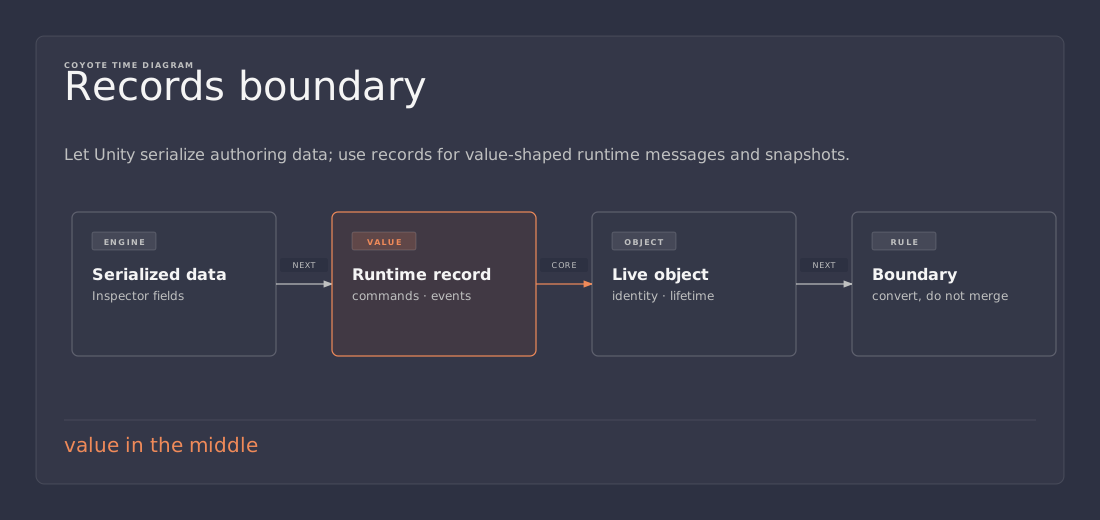
The practical rule is simple: use records after a boundary, not as the boundary itself. Let Unity serialize boring authoring data. Convert that data into compact runtime values when value semantics help. Keep live gameplay objects as normal objects with identity and behavior.
What a record buys you
A normal C# class compares by reference unless it overrides equality. Two instances can contain the same values and still be considered different objects because they are different allocations. That is often correct. A player, enemy, projectile, UI widget, or service is not the same thing as another object just because some fields match.
For data messages, reference equality is often noise.
public sealed record DamageRequest(
    EntityId Source,
    EntityId Target,
    int Amount,
    DamageType Type);

var hit = new DamageRequest(attackerId, targetId, 25, DamageType.Fire);
var criticalHit = hit with { Amount = 50 };
DamageRequest is a good record candidate because it describes a thing the game should process. It is not the attacker. It is not the target. It is not a component with a lifetime. It is a value-shaped request: source, target, amount, type.
A record class gives you value-based equality, generated members, a useful ToString, deconstruction support when you use positional syntax, and with expressions for copying with a changed field. Those features are handy in tests, logs, command queues, editor tools, import pipelines, and glue code between systems.
The generated equality is the main signal. If two requests contain the same source, target, amount, and damage type, treating them as equal probably makes sense. If that sentence sounds wrong for a type, the type probably should not be a record.
Unity objects are identity-shaped
Most live Unity objects are not value-shaped.
A player object is not equal to another player object because both have 100 health. A projectile instance is not equal to another projectile because both came from the same prefab. A MonoBehaviour is a component attached to a scene object. A ScriptableObject is often an asset with editor identity, references, import behavior, and shared usage across scenes.
Those objects exist somewhere. They have identity.
Records describe something. That difference matters more than the syntax.
Identity-shaped                      Value-shaped
---------------                     ----------------
PlayerController                    DamageRequest
Enemy MonoBehaviour                 SpawnCommand
InventoryService                    StatSnapshot
WeaponDefinition asset              MatchmakingOptions
Quest ScriptableObject              SaveMigrationStep
The left side owns behavior, lifetime, engine references, or shared state. The right side moves facts across a boundary. Records belong mostly on the right side.
This is not a purity rule. Game code should not care about language-feature purity. The point is to avoid misleading defaults. A record says equality is based on contents. A scene object usually says equality is based on identity. If the type’s meaning disagrees with the generated behavior, the generated behavior is working against the code.
Do not use records as Unity serialized data by default
Unity serialization is not a general-purpose .NET serializer. It has its own supported field shapes, object-reference behavior, prefab override rules, domain reload behavior, editor display assumptions, and asset persistence model. Records were designed for C# data modeling, not for Unity’s serialized object graph.
Unity’s documentation calls out record caveats directly, including serialization concerns. The safe default is to keep records out of serialized fields unless the exact Unity version and serialization path have been tested.
This is fine:
public sealed record InventoryChange(ItemId Item, int Delta);

public sealed class InventorySystem
{
    public void Apply(InventoryChange change)
    {
        // Runtime message. Unity does not serialize this object.
    }
}
This is where the risk starts:
public sealed class LootTable : MonoBehaviour
{
    [SerializeField] private DropRule defaultRule;
}

public sealed record DropRule(ItemId Item, float Weight);
The second version puts a record directly into Unity’s serialized object graph. Now inspector display, prefab overrides, generated members, init accessors, field rules, and Unity version support all have to line up. Some teams can make a specific version of that work. It is still the wrong default for a shared project unless there is a clear reason and a test around it.
For inspector data, boring code is usually better:
[Serializable]
public sealed class DropRuleData
{
    public ItemDefinition item;
    public float weight;
}
Then convert the authoring data into a runtime value after validation:
public sealed record DropRule(ItemId Item, float Weight);

public static DropRule ToRuntime(DropRuleData data)
{
    return new DropRule(data.item.Id, data.weight);
}
That conversion is not ceremony for its own sake. It gives each side the shape it wants. Unity gets inspector-friendly fields. Runtime code gets a compact value object. Designers do not have to care how records work, and gameplay systems do not have to drag inspector concerns through every method signature.
init support and language versions can still bite
Records are tied to newer C# language features. In modern .NET, the compiler and runtime provide the pieces records expect. Unity moves differently. A Unity version can support a particular C# language level while still having caveats around generated code, runtime profiles, IDE support, and build targets.
Older Unity setups that use record syntax may require an IsExternalInit compatibility shim:
namespace System.Runtime.CompilerServices
{
    internal static class IsExternalInit { }
}
That shim is not scandalous. It is also not a license to spread records through the project. If the project needs it, put it in one obvious file, comment why it exists, and remove it when the Unity/runtime combination no longer needs it.
The boring check is the important one: the project has to compile in CI, on teammate machines, and for the target platforms. A language feature that only works in one local editor setup is not saving time. It is turning a small syntax win into a build-system problem.
This matters even more for record struct. C# 10 added record structs, but Unity language-version support depends on the Unity version and project setup. A post can show the syntax. A production project has to compile it.
public readonly record struct StatSnapshot(
    int Health,
    int Armor,
    float MoveSpeed);
If the toolchain supports it, a small readonly record struct can be a clean value type. If the toolchain does not support it, the theoretical fit does not matter. Use a normal readonly struct or a plain class instead. The code that ships wins over the code that looks current.
Record classes still allocate
A record class is still a reference type. Creating one allocates. A with expression creates a copy. Equality can walk fields. If those fields are reference types or collections, the cost and meaning can be less obvious than the syntax suggests.
For many uses, that cost is fine. A settings object created in a menu is fine. A save migration descriptor is fine. A combat event emitted a few times per hit is probably fine. Editor tooling data is usually fine. Test expectations are fine.
Hot loops are different.
// Suspicious if this runs for thousands of agents every frame.
var next = currentSteering with
{
    DesiredVelocity = desiredVelocity,
    AvoidanceWeight = avoidanceWeight
};
The line is pleasant. Pleasant syntax does not make allocation free. If this runs inside Update for a crowd system, bullet pattern, pathing loop, perception pass, or planner inner loop, it may create garbage that the project did not need.
Do not guess here. Measure. Unity’s profiler, allocation call stacks, and a small benchmark usually answer the question faster than an argument about style. If the record sits on a cold path, keep the clarity. If it sits on a hot path, a normal struct, NativeArray, pooled object, or hand-written value type may be the better trade.
Record structs can avoid the reference allocation, but they do not make copying free. Large structs get expensive to pass around. Mutable structs are easy to misuse. A record struct with many fields, nested structs, or reference members can move the problem instead of solving it.
A useful rule: record classes are for clarity on cold or moderate paths. Record structs are for small values when the supported language version and copy cost make sense. Neither one is a default performance tool.
Good Unity use cases
Records fit best where data crosses a system boundary and should not own behavior.
Commands are a clean example:
public sealed record SpawnEnemyCommand(
    EnemyId Enemy,
    Vector3 Position,
    Quaternion Rotation,
    int Level);
A command describes something that should happen. It can be queued, logged, tested, replayed, rejected, or converted into another request. It is not the enemy instance.
Events are similar:
public sealed record EnemySpawnedEvent(
    EntityId Entity,
    EnemyId Enemy,
    Vector3 Position);
An event describes something that already happened. Value equality helps in tests. Generated ToString helps logs. The type is easy to pass through an event bus or gameplay pipeline because it is just facts.
Snapshots are another good fit:
public sealed record WeaponSnapshot(
    WeaponId Weapon,
    int AmmoInClip,
    int ReserveAmmo,
    float Heat);

var overheated = snapshot with { Heat = 1.0f };
A snapshot is not the live weapon. It is a captured view of the weapon at a point in time. That makes it useful for tests, UI projection, save previews, combat logs, and debugging tools. Copying a snapshot with one field changed can make a rule test small without building a scene.
Validated runtime specs can also work well:
public sealed record AbilitySpec(
    AbilityId Id,
    int BaseDamage,
    float CooldownSeconds,
    DamageType DamageType);
The word validated matters. Let the inspector-facing data stay flexible enough for authoring. Validate and convert it once. Then give runtime code a stable value object that no longer has to ask whether a string id is empty or a referenced asset is missing.
Be careful with Unity values and equality
Records can contain Vector3, Quaternion, Color, and other Unity structs. The syntax is not the issue. The issue is whether generated equality matches the way the game thinks.
Floating-point equality is often too strict. Two positions can be practically identical while still failing exact equality. A generated record equality check uses the equality behavior of its fields. That is useful for some data and misleading for physics-ish results, aiming solutions, steering outputs, animation blends, and sampled positions.
public sealed record AimSolution(Vector3 Direction, float TimeToImpact);
That type is fine as a return value. It becomes dangerous if gameplay starts treating exact equality between two aim solutions as meaningful.
Use records to carry values. Write explicit comparison logic when tolerance matters.
public static bool Approximately(AimSolution a, AimSolution b)
{
    return Vector3.Angle(a.Direction, b.Direction) < 0.5f
        && Mathf.Abs(a.TimeToImpact - b.TimeToImpact) < 0.05f;
}
Unity object references need the same caution. A record that contains a GameObject, Transform, or ScriptableObject mixes value equality with engine identity. Sometimes that is acceptable for a narrow request object. Often it is a smell. Passing ids, asset keys, or definition handles across a boundary usually keeps the record cleaner.
Records are better than repeated tuples at API boundaries
Tuples are useful inside a method:
(Vector3 position, float radius) query = (transform.position, 8f);
That local tuple is harmless. It groups two values for a small piece of code and then disappears.
The same tuple shape becomes harder to defend when it crosses a boundary:
public sealed record AwarenessQuery(Vector3 Position, float Radius);
A named record carries intent. It can be searched. It can be documented. It can grow carefully. Logs show a real type name instead of an anonymous pair. Tests can compare expected values without unpacking every field.
The rule is boring and useful:
- use tuples for throwaway grouping inside one small scope
- use records for named data that crosses method, system, queue, or test boundaries
- use normal classes or structs when behavior, lifecycle, serialization, or performance dominates
That avoids both over-typing and under-typing. Not every pair deserves a new type. Not every repeated tuple should stay anonymous after it becomes part of the design.
A boundary pattern that holds up
The safest Unity pattern is to split authoring data, runtime value data, and live state.
[Serializable]
public sealed class AbilityAuthoringData
{
    public string id;
    public int baseDamage;
    public float cooldownSeconds;
    public DamageType damageType;
}

public sealed record AbilitySpec(
    AbilityId Id,
    int BaseDamage,
    float CooldownSeconds,
    DamageType DamageType);

public sealed class AbilityRuntime
{
    private readonly AbilitySpec spec;
    private float cooldownRemaining;

    public AbilityRuntime(AbilitySpec spec)
    {
        this.spec = spec;
    }

    public bool CanCast => cooldownRemaining <= 0f;
}
The authoring class exists for Unity and designers. It can expose fields because the inspector wants fields. The record exists after validation. It gives runtime systems a compact, comparable value. The runtime class owns mutation, behavior, cooldowns, and lifecycle.
Trying to make one type serve all three roles usually creates the bug farm. If the type is inspector-friendly, it may be too mutable and too Unity-shaped for clean runtime value semantics. If it is record-shaped, it may be awkward or unsupported in Unity serialization. If it owns gameplay behavior, generated value equality probably lies about what the object means.
The boundary looks slightly more verbose at first. It usually removes weirdness later. Serialization bugs stay near authoring data. Runtime code gets clean values. Live objects keep identity. Tests get smaller because they can construct records without scene setup.
When records are not worth it
Avoid records when the generated behavior does not match the model.
Do not use records for most MonoBehaviour types. Do not use them for most ScriptableObject assets. Avoid them for serialized inspector models unless that path has been tested and documented. Avoid them for large mutable state objects. Avoid them for entities where identity matters more than field equality. Avoid them in hot loops until profiling says the allocations or copies are harmless.
Also avoid records when a plain class says the truth better:
public sealed class Health
{
    public int Current { get; private set; }
    public int Max { get; }

    public Health(int max)
    {
        Max = max;
        Current = max;
    }

    public void Damage(int amount)
    {
        Current = Math.Max(0, Current - amount);
    }
}
Health has invariants and behavior. It protects its state. It changes over time. Turning that into a record would make the code look modern while making the model less honest.
Good Unity code is allowed to be boring. A boring serializable class, a boring mutable runtime object, and a boring record used at the right boundary are all better than a clever type that fights its job.
Decision checklist
Before adding a record to a Unity project, ask:
- Is the type mostly data?
- Does value equality match the meaning of the type?
- Will it stay out of Unity serialized fields?
- Is allocation or copy cost acceptable for the path where it is created?
- Does it avoid live Unity object references where ids or definitions would be clearer?
- Does the whole team and build pipeline support the required C# language version?
If most answers are yes, a record is probably reasonable.
If the serialization, identity, language-version, or performance answers are shaky, use a normal class, struct, or serializable data class. That is not old-fashioned. That is matching the type to the job.
Practical takeaway
Use records in Unity for value-shaped runtime data: commands, events, snapshots, validated specs, editor-tool requests, save-pipeline steps, and test expectations. Keep them away from Unity serialization by default. Treat record structs as small value-type tools only when the Unity version and build pipeline support the syntax.
The clean pattern is a boundary. Boring serializable Unity data on one side. Compact runtime records after validation. Normal mutable classes for live gameplay objects. That gives a Unity project the useful part of modern C# without asking the engine serializer or object model to pretend it is something else.
References
- Unity Manual: C# compiler and language version reference — record support caveats, Unity language version, and serialization warning.
- Microsoft Learn: Records in C# — generated members, value equality, record classes, and record structs.
- Microsoft Learn: The history of C# — C# 10 feature list including record structs.
- Microsoft Learn: Tuple types — useful contrast between anonymous grouped values and named record types.